
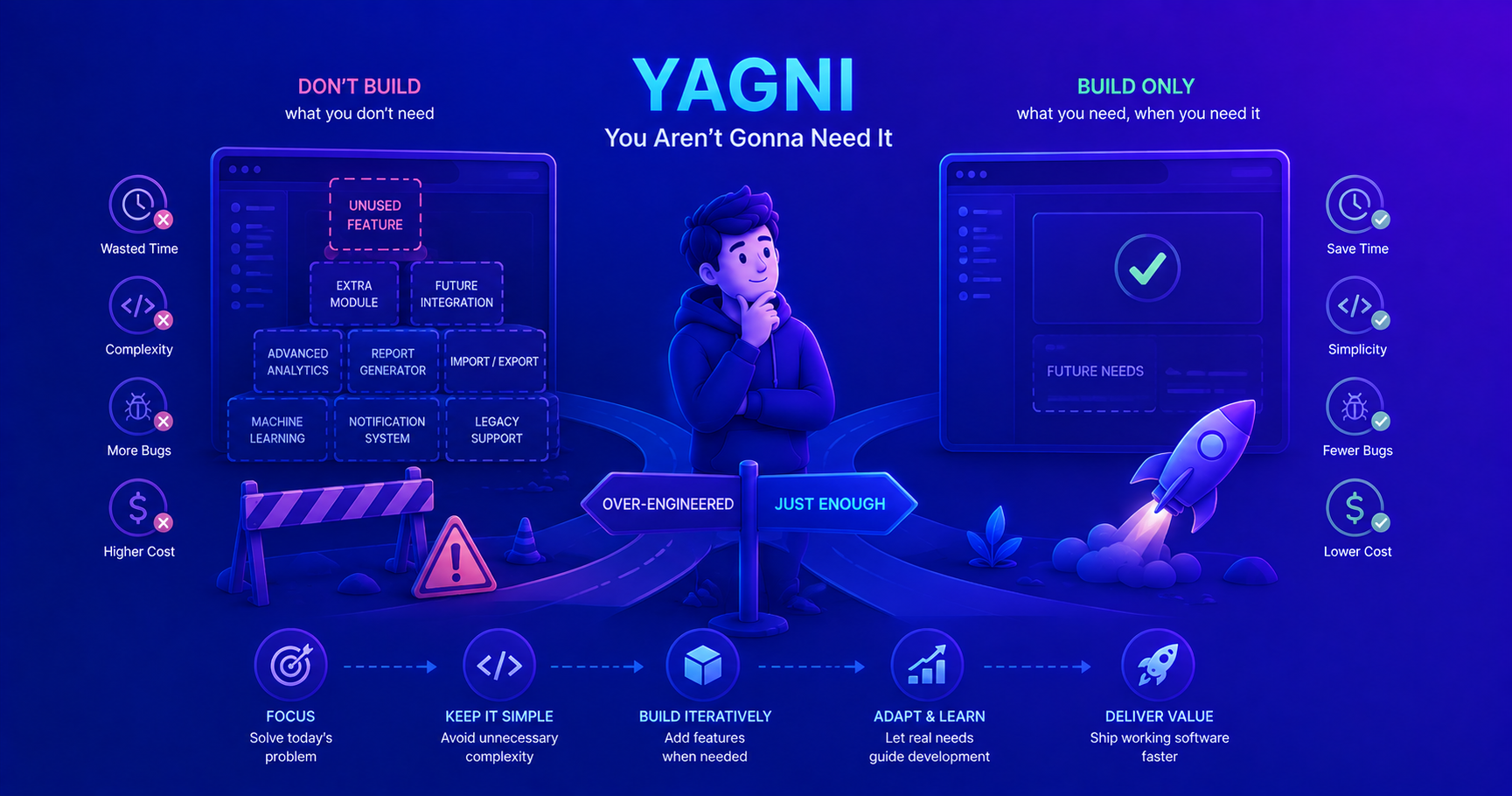
This post introduces the YAGNI principle, a key concept in Agile development. To understand how YAGNI relates to simplicity, check out our post on the KISS Principle!
What Is the YAGNI Principle?
YAGNI stands for “You Aren’t Gonna Need It” - a principle that encourages developers to implement only the functionality that’s needed right now, not what you think you might need in the future. It’s a core practice in Extreme Programming (XP) and Agile methodologies.
The principle challenges a common developer instinct: building systems with extensive flexibility and features “just in case” we need them later. While this sounds prudent, it often leads to wasted effort, increased complexity, and technical debt.
The Core Philosophy
YAGNI is built on a simple observation: most features you think you’ll need in the future, you won’t actually need. And even when you do need them, requirements often change so much that your premature implementation becomes obsolete anyway.
flowchart TB
    Start[Feature Idea] --> Decision{Is it needed NOW?}
    Decision -->|Yes| Implement[Implement it]
    Decision -->|No| Wait[Don't implement yet]

    Implement --> Ship[Ship working software]
    Wait --> Monitor[Monitor actual needs]

    Monitor --> Future{Actually needed later?}
    Future -->|Yes| ImplementLater[Implement with real requirements]
    Future -->|No| Saved[Saved time & effort!]

    ImplementLater --> Better[Better implementation<br/>based on real needs]

    style Wait fill:#90EE90
    style Saved fill:#90EE90
    style Better fill:#90EE90
The cost of implementing a feature before you need it is almost always higher than the cost of implementing it when you actually need it.
Origin and History
The YAGNI principle was formalized by Ron Jeffries, one of the founders of Extreme Programming (XP), in the late 1990s. It emerged as a response to the common practice of “future-proofing” code - adding extensibility, abstraction, and features based on anticipated future requirements.
The Problem YAGNI Solves
Understanding the traditional development trap.
In traditional waterfall development, teams would spend months planning and building systems with extensive functionality to handle every conceivable future scenario. This led to several problems:
- Wasted effort: 64% of features in software are rarely or never used (Standish Group research)
- Increased complexity: More code means more bugs, more maintenance, and higher cognitive load
- Wrong implementations: Future requirements are often guessed incorrectly, making the premature work useless
- Delayed delivery: Time spent on unnecessary features delays actually needed functionality
- Higher maintenance cost: Every line of code needs to be tested, documented, and maintained
YAGNI challenged this approach by advocating for incremental development: build what you need today, and trust that you can add more later when requirements are clearer.
YAGNI in Context
YAGNI doesn’t exist in isolation - it’s part of a broader philosophy of pragmatic software development:
| Principle | Focus | Relationship to YAGNI |
|---|---|---|
| YAGNI | Don’t build features you don’t need yet | Core principle - prevent over-engineering |
| KISS | Keep solutions simple | YAGNI helps maintain simplicity by limiting scope |
| DRY | Don’t Repeat Yourself | Apply DRY to existing code, not hypothetical future code |
| Agile | Respond to change over following a plan | YAGNI enables agility by reducing upfront commitments |
When to Apply YAGNI
Understanding when to apply YAGNI is crucial. It’s not about being short-sighted - it’s about being pragmatic.
Apply YAGNI When:
✅ Adding “just in case” features
1
2
3
4
5
6
7
8
9
10
11
12
13
14
15
16
17
18
19
20
21
// ❌ YAGNI Violation: Adding unused flexibility
public class UserService {
    // Nobody asked for XML, JSON is enough for now
    public String exportUsers(ExportFormat format) {
        switch (format) {
            case JSON: return toJson();
            case XML: return toXml();      // YAGNI!
            case CSV: return toCsv();       // YAGNI!
            case YAML: return toYaml();     // YAGNI!
            default: throw new IllegalArgumentException();
        }
    }
}

// ✅ YAGNI Applied: Build what you need
public class UserService {
    public String exportUsersAsJson() {
        return toJson();
    }
    // Add other formats when actually requested
}
✅ Building extensibility you don’t need
1
2
3
4
5
6
7
8
9
10
11
12
13
14
15
16
17
18
19
20
21
22
23
// ❌ YAGNI Violation: Complex plugin system nobody requested
public interface PaymentProcessor {
    void processPayment(Payment payment);
}

public class PaymentPluginRegistry {
    private Map<String, PaymentProcessor> plugins = new HashMap<>();

    public void registerPlugin(String name, PaymentProcessor processor) {
        plugins.put(name, processor);
    }
    // Lots of plugin management code...
}

// ✅ YAGNI Applied: Simple, direct implementation
public class PaymentService {
    private final StripePaymentProcessor stripeProcessor;

    public void processPayment(Payment payment) {
        stripeProcessor.process(payment);
    }
    // Add more processors when you actually integrate them
}
✅ Premature abstraction
1
2
3
4
5
6
7
8
9
10
11
12
13
14
15
16
17
18
19
20
21
22
// ❌ YAGNI Violation: Abstracting with only one implementation
public interface EmailSender {
    void send(Email email);
}

public abstract class AbstractEmailSender implements EmailSender {
    protected abstract void connect();
    protected abstract void disconnect();
    // Lots of abstract framework code...
}

public class SmtpEmailSender extends AbstractEmailSender {
    // Only concrete implementation
}

// ✅ YAGNI Applied: Concrete implementation first
public class EmailSender {
    public void send(Email email) {
        // Direct SMTP implementation
        // Abstract when you add a second implementation
    }
}
Start concrete, abstract later. Wait until you have at least 2-3 real use cases before creating abstractions.
When NOT to Apply YAGNI:
YAGNI is powerful, but it’s not absolute. There are times when planning ahead is the right choice.
❌ Security and Privacy
1
2
3
4
5
6
7
8
9
10
11
12
13
// ✅ DO implement proper security from the start
public class UserService {
    public void createUser(UserData data) {
        // Hash passwords - don't wait for a breach!
        String hashedPassword = passwordHasher.hash(data.getPassword());

        // Validate input - don't wait for SQL injection!
        validator.validate(data);

        // Log sensitive operations - don't wait for an audit!
        auditLog.log("User created: " + data.getUsername());
    }
}
❌ Core architectural decisions
1
2
3
4
5
6
7
8
9
10
11
12
13
// ✅ DO consider scalability for core architecture
public class OrderService {
    // Use proper database from the start, not CSV files
    private final OrderRepository repository;

    // Use proper IDs, not sequential integers
    private final IdGenerator idGenerator; // UUIDs

    public Order createOrder(OrderData data) {
        String orderId = idGenerator.generate(); // UUID
        return repository.save(new Order(orderId, data));
    }
}
❌ Regulatory and compliance requirements
1
2
3
4
5
6
7
8
9
// ✅ DO implement required data retention policies
public class DataService {
    // GDPR requires data deletion capability - build it now
    public void deleteUserData(String userId) {
        userRepository.delete(userId);
        analyticsRepository.deleteByUser(userId);
        backupService.scheduleRemoval(userId);
    }
}
❌ Known immediate needs
1
2
3
4
5
6
// ✅ DO implement confirmed upcoming requirements
public class ReportService {
    // If you KNOW you need both reports next sprint, build both
    public Report generateDailyReport() { }
    public Report generateWeeklyReport() { }
}
flowchart TB
    Feature[Proposed Feature] --> Q1{Is it a security/<br/>privacy requirement?}
    Q1 -->|Yes| Build[Build it now]
    Q1 -->|No| Q2{Is it a core<br/>architectural decision?}

    Q2 -->|Yes| Build
    Q2 -->|No| Q3{Is it legally/<br/>contractually required?}

    Q3 -->|Yes| Build
    Q3 -->|No| Q4{Is it needed in<br/>current sprint?}

    Q4 -->|Yes| Build
    Q4 -->|No| Q5{Is it confirmed for<br/>next sprint?}

    Q5 -->|Yes| Consider[Consider building now]
    Q5 -->|No| Wait[Apply YAGNI - Wait]

    style Build fill:#90EE90
    style Wait fill:#FFB6C6
    style Consider fill:#FFE4B5
YAGNI is about avoiding speculative features, not avoiding good engineering practices like security, testing, and maintainable architecture.
Common YAGNI Violations
Let’s examine real-world scenarios where developers commonly violate YAGNI and how to fix them.
1. Configuration Overkill
The Violation:
1
2
3
4
5
6
7
8
9
10
11
12
13
14
15
16
17
18
19
20
21
22
23
24
25
// ❌ Building a complex configuration system "in case" we need flexibility
public class DatabaseConfig {
    private String host;
    private int port;
    private String database;
    private int minConnections;
    private int maxConnections;
    private int connectionTimeout;
    private int idleTimeout;
    private boolean enableSSL;
    private String sslMode;
    private boolean enableCompression;
    private String compressionAlgorithm;
    private int compressionLevel;
    private boolean enableRetry;
    private int maxRetries;
    private int retryDelay;
    private String loadBalancingStrategy;
    private boolean enableMetrics;
    private int metricsPort;
    // ... 20 more configuration options nobody asked for

    // Giant builder pattern with fluent API
    public static class Builder { /* ... */ }
}
The Fix:
1
2
3
4
5
6
7
8
9
10
11
12
13
14
// ✅ Start with what you actually need
public class DatabaseConfig {
    private final String host;
    private final int port;
    private final String database;

    public DatabaseConfig(String host, int port, String database) {
        this.host = host;
        this.port = port;
        this.database = database;
    }

    // Add more options when they're actually requested
}
2. Premature Generalization
The Violation:
1
2
3
4
5
6
7
8
9
10
11
12
13
14
15
16
17
18
19
20
21
22
23
24
25
26
27
28
29
30
31
32
33
34
35
36
37
38
39
40
41
// ❌ Creating a "universal" data processor for one use case
public class DataProcessor<T, R, E extends Exception> {
    private final Function<T, R> transformer;
    private final Predicate<T> validator;
    private final Consumer<E> errorHandler;
    private final List<ProcessorPlugin<T, R>> plugins;

    public DataProcessor(Builder<T, R, E> builder) {
        this.transformer = builder.transformer;
        this.validator = builder.validator;
        this.errorHandler = builder.errorHandler;
        this.plugins = builder.plugins;
    }

    public R process(T input) {
        // Complex generic processing pipeline
        if (!validator.test(input)) {
            throw new ValidationException();
        }

        for (ProcessorPlugin<T, R> plugin : plugins) {
            plugin.beforeProcess(input);
        }

        R result = transformer.apply(input);

        for (ProcessorPlugin<T, R> plugin : plugins) {
            plugin.afterProcess(result);
        }

        return result;
    }

    public static class Builder<T, R, E extends Exception> { /* ... */ }
}

// Used in exactly one place:
DataProcessor<String, Integer, RuntimeException> processor =
    new DataProcessor.Builder<String, Integer, RuntimeException>()
        .transformer(Integer::parseInt)
        .build();
The Fix:
1
2
3
4
5
6
7
8
// ✅ Simple, direct solution
public class StringToIntConverter {
    public int convert(String input) {
        return Integer.parseInt(input);
    }
}

// Generalize when you have multiple similar use cases
3. Feature Creep in APIs
The Violation:
1
2
3
4
5
6
7
8
9
10
11
12
13
14
15
16
17
18
19
20
21
22
// ❌ API with methods nobody uses
public interface UserRepository {
    User findById(String id);
    List<User> findAll();
    List<User> findByName(String name);
    List<User> findByEmail(String email);
    List<User> findByAge(int age);
    List<User> findByAgeRange(int min, int max);
    List<User> findByStatus(UserStatus status);
    List<User> findByCreatedDate(LocalDate date);
    List<User> findByCreatedDateRange(LocalDate start, LocalDate end);
    List<User> findByNameAndEmail(String name, String email);
    List<User> findByNameOrEmail(String name, String email);
    // ... 15 more "maybe useful" finder methods

    void save(User user);
    void update(User user);
    void delete(String id);
    void deleteAll();
    void deleteByStatus(UserStatus status);
    // etc...
}
The Fix:
1
2
3
4
5
6
7
8
9
10
11
12
13
14
15
16
// ✅ Implement only what you need now
public interface UserRepository {
    User findById(String id);
    void save(User user);
    void delete(String id);

    // Add methods as features require them
}

// Later, when search is needed:
public interface UserRepository {
    User findById(String id);
    List<User> search(UserSearchCriteria criteria); // One flexible method
    void save(User user);
    void delete(String id);
}
4. Over-Engineered Error Handling
The Violation:
1
2
3
4
5
6
7
8
9
10
11
12
13
14
15
16
17
18
19
20
21
22
23
24
// ❌ Complex error handling system for simple application
public class ErrorManager {
    private final Map<ErrorCode, ErrorHandler> handlers = new HashMap<>();
    private final ErrorLogger logger;
    private final ErrorNotifier notifier;
    private final ErrorRecoveryStrategy recoveryStrategy;

    public void registerHandler(ErrorCode code, ErrorHandler handler) {
        handlers.put(code, handler);
    }

    public void handleError(ApplicationError error) {
        ErrorHandler handler = handlers.get(error.getCode());
        if (handler != null) {
            handler.handle(error);
        }

        logger.log(error);
        notifier.notify(error);
        recoveryStrategy.recover(error);
    }
}

// In practice, only used for: throw new RuntimeException(message);
The Fix:
1
2
3
4
5
6
7
8
9
10
11
12
13
14
15
// ✅ Simple, sufficient error handling
public class OrderService {
    public Order createOrder(OrderRequest request) {
        try {
            validateOrder(request);
            return orderRepository.save(request.toOrder());
        } catch (ValidationException e) {
            throw new BadRequestException("Invalid order: " + e.getMessage());
        } catch (DataAccessException e) {
            throw new ServiceException("Failed to create order", e);
        }
    }
}

// Add sophisticated error handling when you have real requirements
Real-World Case Study: E-Commerce Platform
Let’s walk through a realistic scenario showing YAGNI in action.
The Scenario
You’re building an e-commerce platform MVP. The product owner wants to launch quickly with basic functionality: users can browse products, add to cart, and checkout.
❌ Without YAGNI (Over-Engineered)
1
2
3
4
5
6
7
8
9
10
11
12
13
14
15
16
17
18
19
20
21
22
23
24
25
26
27
28
29
30
31
32
33
34
35
36
37
38
39
40
41
42
43
44
45
46
47
48
49
// Trying to predict every future need
public class ProductService {
    // Multiple database support "just in case"
    private final DatabaseAbstractionLayer dal;

    // Caching layer "for scalability"
    private final MultiLevelCacheManager cacheManager;

    // Event sourcing "for audit trail"
    private final EventStore eventStore;

    // Plugin system "for extensibility"
    private final PluginManager pluginManager;

    public Product getProduct(String id) {
        // Check L1 cache
        Product product = cacheManager.getFromL1Cache(id);
        if (product != null) return product;

        // Check L2 cache
        product = cacheManager.getFromL2Cache(id);
        if (product != null) {
            cacheManager.putInL1Cache(id, product);
            return product;
        }

        // Query database through abstraction layer
        product = dal.query(
            new QueryBuilder()
                .from("products")
                .where("id", id)
                .build()
        );

        // Store in caches
        cacheManager.putInL2Cache(id, product);
        cacheManager.putInL1Cache(id, product);

        // Emit event
        eventStore.append(new ProductAccessedEvent(id));

        // Trigger plugins
        pluginManager.trigger("product.accessed", product);

        return product;
    }
}

// Result: 6 months of development, zero customers
✅ With YAGNI (Pragmatic)
1
2
3
4
5
6
7
8
9
10
11
12
13
14
15
16
// Build what you need now
public class ProductService {
    private final ProductRepository productRepository;

    public Product getProduct(String id) {
        return productRepository.findById(id)
            .orElseThrow(() -> new ProductNotFoundException(id));
    }
}

@Repository
public interface ProductRepository extends JpaRepository<Product, String> {
    // Spring Data JPA provides the implementation
}

// Result: 2 weeks of development, MVP launched, customers onboarded
Evolution with Real Requirements
After launch, you discover actual needs through real usage:
1
2
3
4
5
6
7
8
9
10
11
12
13
14
15
16
17
18
19
20
21
22
23
24
25
26
27
// Iteration 1: Add caching after performance monitoring shows need
@Service
public class ProductService {
    private final ProductRepository productRepository;

    @Cacheable("products")  // Simple caching when needed
    public Product getProduct(String id) {
        return productRepository.findById(id)
            .orElseThrow(() -> new ProductNotFoundException(id));
    }
}

// Iteration 2: Add search when customers request it
@Service
public class ProductService {
    private final ProductRepository productRepository;

    @Cacheable("products")
    public Product getProduct(String id) {
        return productRepository.findById(id)
            .orElseThrow(() -> new ProductNotFoundException(id));
    }

    public List<Product> searchProducts(String query) {
        return productRepository.findByNameContaining(query);
    }
}
Build your MVP fast, learn from real users, then evolve based on actual needs. This is faster and produces better results than trying to predict every future requirement.
Balancing YAGNI with Good Design
YAGNI doesn’t mean writing sloppy code or ignoring design principles. It means being strategic about what you build.
The Balance
| Aspect | YAGNI Says | Good Design Says | The Balance |
|---|---|---|---|
| Abstractions | Don’t abstract prematurely | Avoid duplication | Abstract after 3rd similar case |
| Testing | Test what exists | Ensure quality | Test current code thoroughly |
| Documentation | Document what’s there | Explain design decisions | Document actual usage, not hypotheticals |
| Extensibility | Add when needed | Consider future changes | Use open/closed principle for known extension points |
| Error Handling | Handle actual errors | Be robust | Handle errors you’ve seen or are likely |
YAGNI-Compliant Design Practices
1
2
3
4
5
6
7
8
9
10
11
12
13
14
15
16
17
18
19
20
21
22
23
24
25
26
27
28
// ✅ Good: Clean, testable code without speculation
public class OrderService {
    private final OrderRepository orderRepository;
    private final PaymentService paymentService;
    private final InventoryService inventoryService;

    public Order createOrder(OrderRequest request) {
        // Validate current requirements
        validateOrder(request);

        // Check inventory
        inventoryService.reserve(request.getItems());

        // Process payment
        Payment payment = paymentService.process(request.getPayment());

        // Create order
        Order order = new Order(request, payment);
        return orderRepository.save(order);
    }

    private void validateOrder(OrderRequest request) {
        if (request.getItems().isEmpty()) {
            throw new ValidationException("Order must contain items");
        }
        // Only validations you actually need
    }
}
flowchart LR
    subgraph Good["Good Design Practices"]
        direction TB
        A[Clean Code]
        B[SOLID Principles]
        C[Testing]
        D[Documentation]
    end

    subgraph YAGNI["YAGNI Mindset"]
        direction TB
        E[Current Needs]
        F[No Speculation]
        G[Incremental]
    end

    Good --> Balance[Balanced Approach]
    YAGNI --> Balance

    Balance --> Result[Simple, clean code<br/>that solves today's problems<br/>and can evolve tomorrow]

    style Result fill:#90EE90
Identifying YAGNI Violations
How do you recognize when you’re violating YAGNI? Here are warning signs:
Red Flags 🚩
| Warning Sign | Example | Fix |
|---|---|---|
| “Just in case” language | “Let’s add XML support just in case” | Only add JSON if that’s what’s needed now |
| No current requirement | Building multi-tenancy for single tenant app | Wait for second tenant |
| Abstracting with one use case | Creating framework for one screen | Direct implementation until pattern emerges |
| “We might need this” | Adding 10 configuration options | Add one when first one is requested |
| Speculative performance optimization | Complex caching before measuring | Profile first, optimize later |
| Feature nobody asked for | Admin dashboard for no admins | Build when admins exist |
Self-Assessment Questions
Before adding a feature, ask yourself:
flowchart TB
    Start[Proposed Feature] --> Q1{Is it in current sprint<br/>or user story?}
    Q1 -->|No| Stop[Don't build it yet]
    Q1 -->|Yes| Q2{Do you have specific<br/>requirements?}

    Q2 -->|No| Stop
    Q2 -->|Yes| Q3{Can you test it<br/>with real users?}

    Q3 -->|No| Stop
    Q3 -->|Yes| Q4{Is it the simplest<br/>solution?}

    Q4 -->|No| Simplify[Simplify the design]
    Q4 -->|Yes| Build[Build it!]

    Simplify --> Build

    style Stop fill:#FFB6C6
    style Build fill:#90EE90
- Is it required now? If not in the current sprint/story, don’t build it.
- Can you test it? If there’s no way to validate it works, you don’t understand the requirement well enough.
- Is it the simplest solution? If you can solve it more simply, you probably should.
- Will removing it break existing functionality? If no, you might not need it.
When in doubt, leave it out. It’s easier to add code than to maintain code that shouldn’t exist.
Common Pitfalls and Best Practices
Pitfall 1: Confusing YAGNI with Laziness
Wrong interpretation:
1
2
3
4
5
6
7
8
9
// ❌ This is NOT YAGNI - this is just bad code
public class UserService {
    public void createUser(String username, String password) {
        // No validation "because YAGNI"
        // No error handling "because YAGNI"
        // No logging "because YAGNI"
        users.put(username, password); // Storing plain text passwords!
    }
}
Correct interpretation:
1
2
3
4
5
6
7
8
9
10
11
12
13
14
15
16
17
18
// ✅ YAGNI with good engineering practices
public class UserService {
    public void createUser(String username, String password) {
        // Validate inputs (requirement)
        validateUsername(username);
        validatePassword(password);

        // Hash password (security requirement)
        String hashedPassword = passwordHasher.hash(password);

        // Save user (requirement)
        User user = new User(username, hashedPassword);
        userRepository.save(user);

        // Log for debugging (operational requirement)
        log.info("User created: {}", username);
    }
}
YAGNI is about avoiding speculative features, not avoiding good practices like validation, security, error handling, and logging.
Pitfall 2: Using YAGNI to Avoid Refactoring
Wrong:
1
2
3
4
5
6
7
8
9
10
11
12
13
14
15
16
17
18
19
20
21
// ❌ Refusing to refactor duplicate code "because YAGNI"
public class ReportService {
    public Report generateDailyReport() {
        List<Order> orders = orderRepository.findToday();
        double total = 0;
        for (Order order : orders) {
            total += order.getTotal();
        }
        return new Report("Daily", total, orders.size());
    }

    public Report generateWeeklyReport() {
        List<Order> orders = orderRepository.findThisWeek();
        double total = 0;
        for (Order order : orders) {
            total += order.getTotal();
        }
        return new Report("Weekly", total, orders.size());
    }
    // Duplication because "we might not need more reports"
}
Correct:
1
2
3
4
5
6
7
8
9
10
11
12
13
14
15
16
17
// ✅ Refactor existing code to remove duplication
public class ReportService {
    public Report generateDailyReport() {
        return generateReport("Daily", orderRepository.findToday());
    }

    public Report generateWeeklyReport() {
        return generateReport("Weekly", orderRepository.findThisWeek());
    }

    private Report generateReport(String type, List<Order> orders) {
        double total = orders.stream()
            .mapToDouble(Order::getTotal)
            .sum();
        return new Report(type, total, orders.size());
    }
}
Pitfall 3: Avoiding Design Discussions
YAGNI doesn’t mean you shouldn’t think about design or discuss architecture.
1
2
3
4
5
6
7
8
9
10
11
12
13
14
15
16
17
// ✅ Good: Discuss and plan architecture
/*
 * OrderService handles order creation and validation.
 *
 * Design decisions:
 * - Using repository pattern for data access
 * - Payment processing delegated to PaymentService
 * - Inventory checked synchronously (may need async later)
 *
 * Future considerations (when needed):
 * - Order cancellation workflow
 * - Partial refunds
 * - Multi-currency support
 */
public class OrderService {
    // Current implementation
}
Best Practices for Applying YAGNI
✅ Start with the simplest solution that could possibly work
✅ Refactor mercilessly when duplication appears
✅ Write tests for existing functionality
✅ Document actual decisions, not hypothetical scenarios
✅ Use feature flags for uncertain requirements
1
2
3
4
5
6
7
8
9
10
11
12
13
14
15
16
17
18
19
20
21
22
// ✅ Feature flag for uncertain feature
@Service
public class SearchService {
    private final FeatureFlags featureFlags;

    public List<Product> search(String query) {
        if (featureFlags.isEnabled("advanced-search")) {
            return advancedSearch(query);
        }
        return basicSearch(query);
    }

    private List<Product> basicSearch(String query) {
        // Simple implementation that works
        return productRepository.findByNameContaining(query);
    }

    private List<Product> advancedSearch(String query) {
        // Advanced features being tested
        return elasticSearchService.search(query);
    }
}
✅ Embrace change - make code easy to modify
1
2
3
4
5
6
7
8
9
// ✅ Code that's easy to change
public class NotificationService {
    public void notifyUser(User user, String message) {
        emailSender.send(user.getEmail(), message);
    }

    // When SMS is needed later, easy to add:
    // smsSender.send(user.getPhone(), message);
}
YAGNI and Technical Debt
There’s a common misconception that YAGNI creates technical debt. The opposite is usually true.
Technical Debt Comparison
flowchart LR
    subgraph Without["Without YAGNI"]
        direction TB
        A1[Build 20 features]
        A2[Use 3 features]
        A3[Maintain all 20]
        A4[High debt]
        A1 --> A2 --> A3 --> A4
    end

    subgraph With["With YAGNI"]
        direction TB
        B1[Build 3 features]
        B2[Use 3 features]
        B3[Maintain 3]
        B4[Low debt]
        B1 --> B2 --> B3 --> B4
    end

    style A4 fill:#FFB6C6
    style B4 fill:#90EE90
| Approach | Code Written | Code Used | Code Maintained | Debt |
|---|---|---|---|---|
| Without YAGNI | 10,000 lines | 3,000 lines | 10,000 lines | High |
| With YAGNI | 3,000 lines | 3,000 lines | 3,000 lines | Low |
Real Technical Debt
Technical debt comes from:
- ❌ Poor code quality
- ❌ Skipping tests
- ❌ Ignoring design principles
- ❌ Taking shortcuts on security
NOT from:
- ✅ Building only requested features
- ✅ Waiting for clear requirements
- ✅ Keeping code simple
- ✅ Deferring speculation
Every line of unused code is technical debt. YAGNI reduces debt by reducing unnecessary code.
Practical Tips for Junior Developers
As a junior developer, YAGNI can feel counterintuitive. Here’s how to build the right instincts:
1. Listen to Requirements Carefully
1
2
3
4
5
6
7
8
9
10
11
12
13
14
15
16
17
// Requirement: "Users need to export their data"

// ❌ Over-interpretation
public class DataExporter {
    public void export(User user, ExportFormat format, CompressionType compression,
                      EncryptionType encryption, DeliveryMethod delivery) {
        // Assumed we need all these options
    }
}

// ✅ Clarify and build what's actually needed
public class DataExporter {
    public String exportAsJson(User user) {
        // That's literally all they wanted
        return jsonMapper.writeValueAsString(user);
    }
}
2. Resist “Cool Technology” Syndrome
1
2
3
4
5
6
7
8
9
10
11
12
13
// ❌ "I just learned about reactive programming!"
public Flux<Product> getProducts() {
    return productRepository.findAll()
        .subscribeOn(Schedulers.parallel())
        .publishOn(Schedulers.elastic())
        .cache();
}
// For a list of 10 products...

// ✅ Use appropriate technology for the problem
public List<Product> getProducts() {
    return productRepository.findAll();
}
3. Ask “Why?” Three Times
Before adding a feature:
- Why do we need this? - Understand the real requirement
- Why not add it later? - Challenge the timing
- Why this approach? - Ensure it’s the simplest solution
4. Use Code Reviews to Learn
When reviewing code, ask:
- “Is this feature being used?”
- “Could we solve this more simply?”
- “What requirement drove this design?”
5. Track Features Post-Launch
1
2
3
4
5
6
7
8
9
10
11
12
13
14
15
// Add simple usage metrics
@Service
public class ReportService {
    private final MetricsService metrics;

    public Report generateReport(ReportType type) {
        metrics.increment("report.generated." + type);
        // ... generate report
    }
}

// After a month, check metrics:
// report.generated.daily: 1,247
// report.generated.weekly: 43
// report.generated.monthly: 0  <- Maybe we don't need this yet!
Track feature usage to validate whether you’re building the right things. Let data guide your decisions.
Conclusion
The YAGNI principle is deceptively simple but profoundly impactful: don’t build features until you actually need them. It’s not about being short-sighted or lazy - it’s about being pragmatic and focusing your efforts on delivering value.
Key Takeaways
✅ YAGNI prevents over-engineering by deferring speculative features
✅ Focus on current requirements, not imagined future needs
✅ YAGNI complements KISS and DRY - they work together for better code
✅ Balance YAGNI with good practices - security, testing, and maintainability are not negotiable
✅ Exceptions exist - security, architecture, and legal requirements shouldn’t wait
✅ Trust in refactoring - you can add complexity when needed
✅ Measure feature usage - let data guide your development
Applying YAGNI in Your Work
Start small:
- Question each new feature: Is it needed now?
- Simplify your first draft: Can you remove anything?
- Defer abstraction: Wait for the third use case
- Review unused code: Delete features that aren’t being used
- Embrace incremental development: Build, learn, adapt
The best code is no code. The second best code is simple code that solves today’s problems and can adapt to tomorrow’s needs.
Remember: you’re not predicting the future, you’re building software that can evolve. YAGNI helps you stay focused on what matters right now while keeping your codebase lean, maintainable, and ready to adapt.
Now go forth and build only what you need - your future self will thank you!
Further Reading
- Extreme Programming - Original source of YAGNI
- Martin Fowler on YAGNI
- KISS Principle - Complementary simplicity principle
- Design Patterns - When to apply design patterns (after, not before the need)