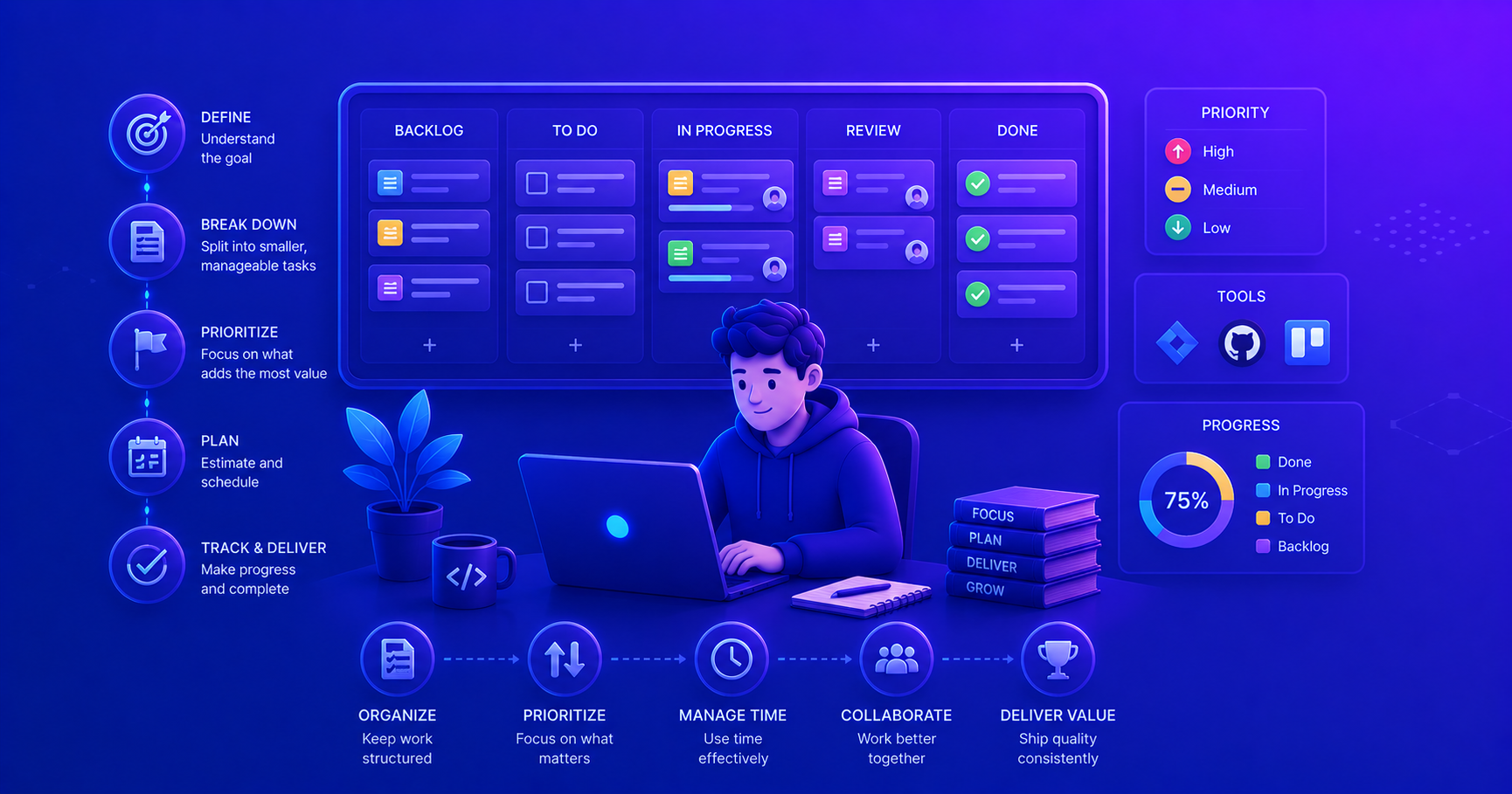
Task management is closely related to Time Management, but focuses specifically on organizing, prioritizing, and executing individual work items. While time management helps you allocate your hours wisely, task management ensures you’re working on the right things at the right time.
What is Task Management?
Task management is the process of managing a task through its entire lifecycle, from creation and planning, through execution and tracking, to completion. In software development, this means taking a feature request or bug report and systematically breaking it down, planning the work, executing it, and delivering results.
For junior software engineers, effective task management is critical because:
- You’re still learning how to estimate complexity accurately
- You’re juggling coding tasks with learning and meetings
- You need to demonstrate progress and reliability to your team
- You’re building habits that will define your entire career
Task management isn’t just about getting things done, it’s about getting the right things done well and being able to communicate your progress clearly.
Task Management vs. Time Management
While these concepts overlap, they address different aspects of productivity:
| Aspect | Time Management | Task Management |
|---|---|---|
| Focus | How you spend your hours | What work you complete |
| Granularity | Blocks of time (hours, days) | Individual tasks and subtasks |
| Goal | Maximize productive time | Maximize value delivered |
| Key Question | “Am I using my time well?” | “Am I working on the right thing?” |
| Tools | Calendars, time blocking, Pomodoro | Jira, Trello, GitHub Projects, task lists |
| Outcome | Better time allocation | Completed, prioritized work items |
Example: You might have excellent time management (focused 6-hour coding blocks), but poor task management (working on low-priority tasks while critical bugs wait). Both skills are essential!
"In my first sprint, I spent three days perfecting a nice-to-have feature while a blocker bug sat in the backlog. My time management was good, I had focused work time. But my task management was terrible, I wasn't working on the right priority. Learning to ask 'Is this the most important thing right now?' changed my effectiveness."
Why Task Management Matters in Software Development
Software development presents unique task management challenges:
flowchart TB
    subgraph Challenges["Task Management Challenges"]
        direction TB
        US[User Story: Add Login Feature]
        US --> B1[Break into subtasks]
        B1 --> T1[Design DB schema]
        B1 --> T2[Implement API endpoints]
        B1 --> T3[Create UI components]
        B1 --> T4[Write unit tests]
        B1 --> T5[Update documentation]

        T2 --> DEP[Dependencies & Blockers]
        T3 --> DEP
        DEP --> PR[Prioritization needed]

        T4 --> EST[Estimation uncertainty]
        T5 --> EST
        EST --> TRACK[Progress tracking]
    end

    style US fill:#e1f5ff
    style DEP fill:#ffe1e1
    style PR fill:#fff4e1
Common Task Management Pitfalls for Junior Developers
- Not breaking down tasks - Trying to tackle “Implement authentication” as one task
- Poor prioritization - Working on interesting tasks instead of important ones
- Lack of visibility - Team doesn’t know what you’re working on or if you’re blocked
- Scope creep - Adding “just one more thing” to a task repeatedly
- No tracking system - Keeping tasks in your head or scattered notes
Core Task Management Principles
1. Task Breakdown: From User Story to Actionable Work
A user story like “As a user, I want to reset my password” needs to be broken down into concrete, actionable tasks.
The SMART Task Framework
Making tasks Specific, Measurable, Achievable, Relevant, and Time-bound.
Each task should be:
- Specific: Clear what needs to be done (“Implement password reset API endpoint”)
- Measurable: You can tell when it’s complete (“Endpoint returns 200 for valid email”)
- Achievable: Completable in one sitting or day
- Relevant: Contributes to the user story/sprint goal
- Time-bound: Has an estimated completion time (2-4 hours)
Bad Task: “Work on password feature” Good Task: “Create POST /api/password-reset endpoint that validates email and sends reset token (Est: 3 hours)”
Task Breakdown Example
flowchart TD
    US["User Story:<br/>Password Reset Feature<br/>(8 Story Points)"]

    US --> T1["1. Design DB schema<br/>for reset tokens<br/>(2 hours)"]
    US --> T2["2. Create API endpoint<br/>POST /password-reset<br/>(3 hours)"]
    US --> T3["3. Email service integration<br/>(4 hours)"]
    US --> T4["4. Build reset form UI<br/>(4 hours)"]
    US --> T5["5. Write unit tests<br/>(3 hours)"]
    US --> T6["6. Update API docs<br/>(1 hour)"]

    T1 --> PR1[PR #1: Database]
    T2 --> PR2[PR #2: API]
    T3 --> PR2
    T4 --> PR3[PR #3: Frontend]
    T5 --> PR2
    T5 --> PR3
    T6 --> PR4[PR #4: Docs]

    style US fill:#e1f5ff
    style T1 fill:#e8f5e9
    style T2 fill:#e8f5e9
    style T3 fill:#e8f5e9
    style T4 fill:#e8f5e9
    style T5 fill:#e8f5e9
    style T6 fill:#e8f5e9
Notice how each subtask is concrete, estimated, and maps to pull requests. This makes progress visible and work manageable.
2. Task Prioritization Techniques
The Eisenhower Matrix for Development Tasks
Borrowed from time management but essential for task management:
flowchart TB
    subgraph Matrix["Eisenhower Matrix for Dev Tasks"]
        direction TB

        subgraph Q1["Quadrant 1: URGENT & IMPORTANT<br/>Do First"]
            direction TB
            Q1T1["Production bug<br/>affecting users"]
            Q1T2["Blocker preventing<br/>team progress"]
            Q1T3["Security vulnerability"]
        end

        subgraph Q2["Quadrant 2: NOT URGENT but IMPORTANT<br/>Schedule"]
            direction TB
            Q2T1["Sprint story<br/>implementation"]
            Q2T2["Code refactoring"]
            Q2T3["Learning new tools<br/>for upcoming feature"]
        end

        subgraph Q3["Quadrant 3: URGENT but NOT IMPORTANT<br/>Delegate/Minimize"]
            direction TB
            Q3T1["Some meeting<br/>requests"]
            Q3T2["Minor UI tweaks<br/>not in requirements"]
            Q3T3["Unnecessary<br/>interruptions"]
        end

        subgraph Q4["Quadrant 4: NOT URGENT & NOT IMPORTANT<br/>Eliminate"]
            direction TB
            Q4T1["Over-engineering<br/>solutions"]
            Q4T2["Premature<br/>optimization"]
            Q4T3["Gold-plating<br/>features"]
        end
    end

    style Q1 fill:#ffcdd2
    style Q2 fill:#c8e6c9
    style Q3 fill:#fff9c4
    style Q4 fill:#e0e0e0
MoSCoW Prioritization Method
Used extensively in Agile development:
| Priority | Meaning | Example in Development |
|---|---|---|
| Must Have | Critical for release | User authentication, core CRUD operations |
| Should Have | Important but not vital | Input validation messages, loading indicators |
| Could Have | Nice to have if time permits | Advanced search filters, export to CSV |
| Won’t Have | Not planned for this iteration | AI-powered recommendations, mobile app |
Priority Poker
Team-based prioritization technique.
When you’re unsure about task priority:
- List all tasks for the sprint or day
- Estimate effort (T-shirt sizes: S, M, L, XL or hours)
- Assess value (High, Medium, Low impact)
- Calculate priority score: Value / Effort
- Work on highest scores first
Example:
- Task A: High value (3) / Large effort (8) = 0.375
- Task B: Medium value (2) / Small effort (2) = 1.0
- Start with Task B - better ROI
This prevents spending days on low-impact work.
3. Task Estimation for Junior Developers
Estimation is hard, especially when you’re still learning. Here’s a practical approach:
The Three-Point Estimation Technique
flowchart LR
    TASK[Task: Implement search API]

    TASK --> BEST[Best Case: 2 hours]
    TASK --> LIKELY[Most Likely: 4 hours]
    TASK --> WORST[Worst Case: 8 hours]

    BEST --> EST[Formula: 2 + 16 + 8 divided by 6 = 4.3 hours]
    LIKELY --> EST
    WORST --> EST

    EST --> BUFFER[Add 20 percent buffer: Final 5-6 hours]

    style TASK fill:#e1f5ff
    style EST fill:#fff4e1
    style BUFFER fill:#c8e6c9
It’s better to overestimate and finish early than underestimate and disappoint. As you gain experience, your estimates will become more accurate.
Estimation Tips for Juniors
- Break tasks into 2-4 hour chunks - Easier to estimate small pieces
- Track your actual time - Compare estimates to reality, learn patterns
- Ask for help - “I estimate 6 hours for this API endpoint, does that sound right?”
- Include testing time - Writing tests is part of “done”
- Account for context switching - A 3-hour task might take 4 hours with interruptions
- Add learning time - First time using a library? Add 50% extra
Task Management Tools and Workflows
Popular Tools for Software Teams
| Tool | Best For | Key Features | Junior-Friendly |
|---|---|---|---|
| Jira | Scrum/Agile teams | Sprint planning, story points, burndown charts | ⭐⭐⭐ (Complex but industry standard) |
| GitHub Projects | Code-centric teams | Integrated with PRs, issues, automation | ⭐⭐⭐⭐ (Simple, familiar to devs) |
| Trello | Visual/simple workflows | Drag-and-drop boards, easy to learn | ⭐⭐⭐⭐⭐ (Excellent for beginners) |
| Linear | Modern dev teams | Fast, keyboard shortcuts, Git integration | ⭐⭐⭐⭐ (Clean, intuitive) |
| Asana | Cross-functional teams | Timeline view, dependencies, portfolios | ⭐⭐⭐ (More project management focus) |
Task States and Workflow
A typical task moves through these states:
stateDiagram-v2
    [*] --> Backlog: Task created
    Backlog --> ToDo: Prioritized for sprint
    ToDo --> InProgress: Developer starts work
    InProgress --> InReview: PR created
    InReview --> InProgress: Changes requested
    InReview --> Testing: PR approved & merged
    Testing --> InProgress: Bug found
    Testing --> Done: QA passed
    Done --> [*]: Task complete

    InProgress --> Blocked: Dependency issue
    Blocked --> InProgress: Blocker resolved
What Each State Means
Backlog
Task is defined but not yet scheduled.
Actions:
- Task exists with description
- May have rough estimate
- Not assigned to anyone
- Not committed to a timeline
Junior Developer Role:
- Review backlog in refinement meetings
- Ask clarifying questions
- Suggest breakdown of large items
To Do
Task is scheduled for current sprint.
Actions:
- Prioritized and committed
- Assigned to a developer
- Acceptance criteria clear
- Dependencies identified
Junior Developer Role:
- Confirm you understand requirements
- Ask about edge cases
- Clarify “definition of done”
In Progress
Actively being worked on.
Actions:
- Branch created
- Code being written
- Regular commits being made
- Update daily standups
Junior Developer Role:
- Move task here when you start
- Keep it updated (add comments about progress)
- Flag blockers immediately
- Don’t have multiple tasks “In Progress”
Common mistake: Having 5 tasks “In Progress”, finish one before starting another!
In Review
Pull request created, awaiting review.
Actions:
- PR created with description
- Tests passing
- Ready for team review
- Respond to feedback promptly
Junior Developer Role:
- Write clear PR description
- Link to the task/issue
- Add screenshots for UI changes
- Be responsive to review comments
Blocked
Cannot proceed due to external dependency.
Actions:
- Clearly document the blocker
- Tag relevant people
- Find workarounds if possible
- Move to other tasks
Junior Developer Role:
- Don’t stay blocked silently! Communicate immediately
- Explain what’s blocking you and who can help
- Ask in team chat or standup
- Find another task while waiting
Example blocked comment:
“Blocked on API endpoint
/usersreturning 500. Tagged @backend-team. Moving to work on UI mockup in the meantime.”
Creating Effective Tasks in Your Tool
Bad Task in Jira/GitHub:
1
2
Title: Fix login
Description: (empty)
Good Task in Jira/GitHub:
1
2
3
4
5
6
7
8
9
10
11
12
13
14
15
16
17
18
19
20
21
22
23
24
25
26
27
28
29
30
31
32
33
34
Title: [BUG] Login fails with 401 for valid credentials after password reset

Description:
## Problem
Users who reset their password get 401 Unauthorized when trying to log in
with their new password.

## Steps to Reproduce
1. Go to /forgot-password
2. Enter email and reset password
3. Use new password to log in
4. Observe 401 error

## Expected Behavior
Login should succeed with new password

## Actual Behavior
Returns 401, old password still works

## Acceptance Criteria
- [ ] New password works immediately after reset
- [ ] Old password is invalidated after reset
- [ ] Unit test added for password reset flow
- [ ] Manual testing passed on staging

## Technical Notes
Possible issue with password hash not being saved in reset endpoint.
Check `UserService.resetPassword()` method.

## Estimated Effort
3-4 hours

## Priority
High - blocking production users
The second version gives anyone reading the task (including your future self) everything they need to understand and work on it.
Practical Task Management Workflows
The Daily Task Planning Ritual
Start each day with a 10-minute planning ritual:
flowchart TD
    START[Start of Day]

    START --> REVIEW[Review yesterday's<br/>completed tasks]
    REVIEW --> CARRYOVER{Any tasks<br/>in progress?}

    CARRYOVER -->|Yes| PRIORITY1[Priority 1:<br/>Finish in-progress tasks]
    CARRYOVER -->|No| NEWDAY[Check sprint board]

    PRIORITY1 --> PRIORITY2[Priority 2:<br/>Check for blockers<br/>or urgent issues]
    NEWDAY --> PRIORITY2

    PRIORITY2 --> PRIORITY3[Priority 3:<br/>Pick next highest<br/>priority task]

    PRIORITY3 --> PLAN[Plan your day:<br/>2-3 main tasks<br/>max]

    PLAN --> UPDATE[Update task status<br/>to 'In Progress']

    UPDATE --> CODE[Start coding!]

    style START fill:#e1f5ff
    style PLAN fill:#c8e6c9
    style CODE fill:#fff4e1
Example Daily Plan (Realistic for Junior Dev)
Monday, 9:00 AM:
1
2
3
4
5
6
7
8
9
10
11
12
13
14
15
16
17
18
19
20
21
22
23
24
✅ Completed Yesterday:
- Fixed validation bug in registration form (#234)
- Reviewed PR from @teammate

🎯 Today's Focus (3 tasks max):

1. HIGH PRIORITY (Morning - 3 hrs)
   Task: Complete user profile API endpoint (#245)
   Status: In Progress (60% done, just need tests)

2. MEDIUM PRIORITY (Afternoon - 2 hrs)
   Task: Code review for 2 pending PRs
   Status: To Do

3. LEARNING (End of day - 1 hr)
   Task: Research GraphQL for next sprint
   Status: Personal backlog

⏰ Meetings:
- 9:15 AM: Daily Standup (15 min)
- 2:00 PM: Sprint Refinement (1 hr)

🚧 Potential Blockers:
- Waiting on design mockup for Task #250 (but not blocking today)
The Weekly Review Process
Every Friday, spend 15 minutes reviewing your week:
- What tasks did I complete? (Celebrate wins!)
- What took longer than estimated? (Learn patterns)
- What blockers did I face? (How to prevent next time?)
- What did I learn? (Technical and process)
- What’s my plan for next week? (Get ahead of Monday)
Handling Common Task Management Scenarios
Scenario 1: You’re Blocked on a Task
❌ Don’t do this:
- Stay blocked for hours/days without telling anyone
- Sit idle waiting for someone to notice
- Keep the task “In Progress” with no updates
✅ Do this:
- Try to unblock yourself (15-30 min max)
- Check documentation
- Search Slack/team chat history
- Review similar past tickets
- Communicate the blocker
1
2
3
4
In Slack: "@backend-team I'm blocked on task #245. Need the
`/users/profile` endpoint to return the `avatar_url` field,
but it's currently null. Can someone help? Marking task as
blocked and working on #248 in the meantime."
Update task status to “Blocked” with details
Switch to another task - Don’t waste time
- Follow up if no response in a reasonable time (2 hours for urgent, next day for normal)
Scenario 2: Task is Bigger Than You Thought
You estimated 4 hours, you’re at hour 6, and only 40% done.
✅ Do this:
- Stop and assess - Why is it taking longer?
- Scope grew?
- Unexpected complexity?
- Lack of knowledge?
- Communicate early ``` Update task #245: “Original estimate was 4 hours, now looks like 10-12 hours due to needing to refactor the entire auth middleware. Recommend breaking into 2 tasks:
- Minimal fix (2 hrs) for current bug
- Proper refactor (8 hrs) for next sprint
What’s the priority?” ```
- Ask for guidance - Your team lead/senior will appreciate early warning
Missing an estimate isn’t failure, it’s learning. Hiding that you’re going to miss a deadline is the real problem.
Scenario 3: Multiple Urgent Tasks at Once
It’s Tuesday, and you have:
- A production bug (HIGH)
- A code review request (MEDIUM)
- Your sprint task due today (HIGH)
- A meeting in 1 hour
✅ Do this:
Don’t panic - Take 5 minutes to prioritize
- Use the Eisenhower Matrix:
- Production bug → URGENT & IMPORTANT (do first)
- Sprint task → IMPORTANT not urgent (do after bug)
- Code review → URGENT not important (do quickly or ask to reassign)
- Meeting → Attend if required, or ask to be excused given the bug
- Communicate with your team:
1
2
3
4
Team update: Production bug (#456) is my top priority now.
This means my sprint task (#245) will be delayed 3-4 hours.
@teammate can you take the code review for PR #189? I'll
pick up your next review. Thanks!
- Work on highest priority without guilt
Scenario 4: Task Requirements Are Unclear
You start a task and realize you don’t understand what’s actually needed.
❌ Don’t do this:
- Guess what they want and hope you’re right
- Build something and hope it gets approved
- Stay stuck trying to figure it out alone
✅ Do this:
Re-read the task carefully - Maybe you missed something
Check for existing examples - Similar features in the codebase?
Ask specific questions:
Bad question:
“I don’t understand task #245, what should I do?”
Good question:
“For task #245 (user profile endpoint), I have some questions:
- Should we return all user fields or just public ones?
- Do non-authenticated users get access to profiles?
- Should profile photos be returned as URLs or base64?
I’m assuming yes, no, and URLs based on our other endpoints, but want to confirm before implementing.”
Propose a solution when asking - Shows you’re thinking
Task Management Best Practices for Junior Developers
1. The One-Task-at-a-Time Rule
Work on one task at a time. Resist the temptation to have 5 tasks “In Progress.”
Why? Context switching kills productivity. Every time you switch tasks, you lose 15-20 minutes regaining context.
How?
- Move task to “In Progress” when you start
- Complete it (or get blocked)
- Move to “In Review” or “Done”
- Only then start the next task
Exception: You’re blocked and waiting for someone else.
2. Update Tasks Daily
Make it a habit:
- Morning: Check your task board, move today’s task to “In Progress”
- End of day: Add a comment with progress, move completed tasks to “Done”
- When blocked: Update status immediately
This habit builds trust with your team, they know what you’re working on and if you need help.
3. Ask for Help After 30 Minutes of Being Stuck
As a junior, you’re expected to ask questions. The anti-pattern is:
- Struggling silently for 4 hours
- Finally asking for help
- Senior developer fixes it in 10 minutes
- You’ve wasted 4 hours and delayed the task
Better approach:
- Try to solve it yourself (15-30 min)
- Google, check docs, review similar code
- If still stuck, ask for help with context:
1
2
3
4
5
6
7
8
9
"I'm working on task #245 (adding password validation).
I tried implementing the regex pattern from our docs,
but it's rejecting valid passwords with special chars.

Here's my code: [link to branch]
Error I'm seeing: [paste error]
What I've tried: [list attempts]

Can someone point me in the right direction?"
4. Break Large Tasks Into Subtasks
If a task feels overwhelming, break it down:
Original task: “Implement user dashboard”
Broken down:
- Create dashboard route and controller
- Design database query for user stats
- Build React dashboard component
- Add charts using Chart.js library
- Write unit tests for stats calculation
- Write E2E test for dashboard page
- Update documentation
Now each subtask is manageable and you can track progress better.
5. Learn from Your Task History
Every few weeks, review your completed tasks:
- What types of tasks do you complete quickly? (Your strengths!)
- What types take longer than estimated? (Areas to improve)
- What blockers come up repeatedly? (Systematic issues to address)
This self-awareness accelerates your growth.
Task Management Anti-Patterns to Avoid
| Anti-Pattern | Why It’s Bad | Better Approach |
|---|---|---|
| Cherry-picking easy tasks | Avoiding challenging work stunts your growth | Mix of comfortable and stretch tasks |
| Letting tasks grow stale | Task “In Progress” for weeks with no updates | Update status or close if not relevant |
| Not writing anything down | Tasks in your head get forgotten | Capture everything in your tool |
| Over-committing in sprints | Setting yourself up for failure and stress | Be realistic with capacity, account for learning |
| Not celebrating done | Missing the motivation boost | Acknowledge completed work, learn from it |
| Siloed work | No one knows what you’re doing until PR | Regular updates, pair programming, asking for feedback early |
Integrating Task Management with Development Workflow
Git Branch Naming Convention
Link your branches to tasks:
1
2
3
4
5
# Pattern: <type>/<task-id>-<short-description>

git checkout -b feature/JIRA-245-user-profile-api
git checkout -b bugfix/GH-456-login-401-error
git checkout -b hotfix/JIRA-789-payment-crash
Benefits:
- Instantly know what branch is for what task
- Easy to track multiple branches
- Tools can auto-link PRs to tasks
Commit Messages Referencing Tasks
1
2
3
4
5
6
git commit -m "feat: add password validation endpoint

Implements password strength checking with regex pattern.
Includes unit tests for various password formats.

Resolves #245"
Keywords that auto-close issues:
Fixes #123Closes #123Resolves #123
When merged, the task automatically moves to “Done” in many tools!
Pull Request Template with Task Context
1
2
3
4
5
6
7
8
9
10
11
12
13
14
15
16
17
18
## Related Task
Closes #245

## Changes
- Added POST /api/user/profile endpoint
- Implements avatar upload to S3
- Returns updated user object

## Testing
- [ ] Unit tests pass
- [ ] Manual testing completed
- [ ] Tested on staging environment

## Screenshots
[If UI changes]

## Notes
Used the same auth middleware as /api/user endpoint for consistency.
Measuring Your Task Management Improvement
Track these metrics (informally, for yourself):
- Velocity: How many story points/tasks you complete per sprint
- Estimation accuracy: Actual time vs. estimated time
- Cycle time: How long tasks stay “In Progress”
- Blocked time: How often you’re blocked and for how long
- First-time-right rate: How often tasks pass review without changes
Don’t gamify these, use them to understand your patterns and improve.
Resources and Further Learning
This post was informed by research on task management best practices. For deeper exploration:
- Wrike’s Task Management Skills Guide - Comprehensive overview of task management principles
- Your team’s task management tool documentation (Jira, GitHub Projects, etc.)
- “Getting Things Done” by David Allen - Classic productivity system
- Agile/Scrum methodology guides for understanding sprint-based task management
Remember: Task management is a skill you build over time. Start with the basics, one task at a time, clear priorities, daily updates. The advanced techniques will come naturally as you gain experience.
Conclusion
Effective task management is one of the most valuable skills you can develop as a junior software engineer. It’s not just about productivity, it’s about:
- Building trust with your team through clear communication
- Reducing stress by working on the right priorities
- Accelerating learning by focusing on valuable work
- Demonstrating professionalism through organized execution
Start with these core habits:
- ✅ Break large work into small, concrete tasks
- ✅ Work on one thing at a time
- ✅ Update your task status daily
- ✅ Communicate blockers immediately
- ✅ Estimate conservatively and track accuracy
- ✅ Use your team’s tools consistently
- ✅ Review and learn from your task history
Task management complements time management, together, they form the foundation of professional software engineering work. Master these skills early, and you’ll stand out as a reliable, organized developer who consistently delivers value.
Your future self (and your team) will thank you! 🚀