
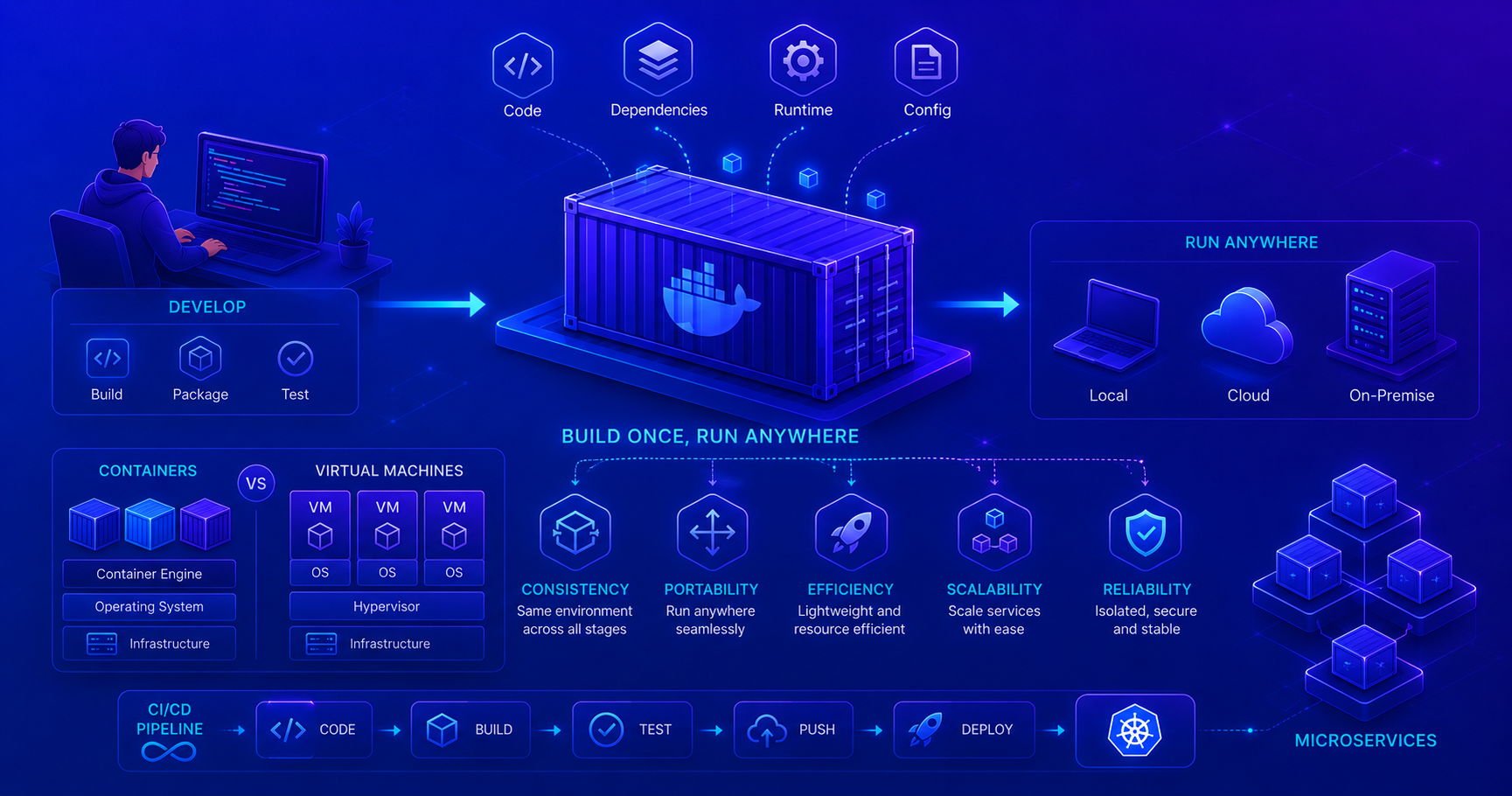
This post introduces containerization, a foundational infrastructure skill. Containerization enables consistent application deployment across different environments and is the backbone of modern DevOps practices.
What is Containerization?
Imagine you’re shipping a physical product. Instead of worrying about whether it fits in a truck, fits through a doorway, or survives different weather conditions, you pack it in a standardized container. Everything needed to protect and transport that product is included, and the container works the same way everywhere it goes.
Containerization applies this same principle to software. A container is a lightweight, standalone, executable package that includes your application code, runtime, system tools, and dependencies. It runs consistently everywhere, on your laptop, your colleague’s machine, or a production server in the cloud.
The most popular containerization technology is Docker, created in 2013. Docker made containers accessible and practical for everyday development and is now the industry standard.
Containers vs Virtual Machines vs Bare Metal
Understanding how containers fit into the broader infrastructure picture helps clarify their advantages and use cases.
| Aspect | Bare Metal | Virtual Machines | Containers |
|---|---|---|---|
| What it is | Application runs directly on OS | Full OS virtualized with hypervisor | Lightweight process isolation |
| Resource usage | Minimal overhead | High (each VM needs full OS) | Low (shared OS kernel) |
| Boot time | N/A | Minutes | Seconds |
| Isolation level | None | Strong (separate OS) | Process-level (shared OS kernel) |
| Portability | Low (hardware dependent) | Medium (VM image format) | High (runs anywhere with Docker) |
| Use case | Legacy apps, specific performance needs | Complex isolation requirements | Microservices, modern apps |
| Number you can run | 1 per machine | 5-20 per machine | 50-100+ per machine |
Why Containers Matter
Containers solve a critical problem in software development: the difference between “it works on my machine” and “it doesn’t work in production.”
Traditional deployment challenges:
- Different development, testing, and production environments
- Dependency conflicts and version mismatches
- Slow deployment processes
- Difficulty managing multiple applications on the same server
Containerization solves these by:
- Packaging everything together: Code, dependencies, runtime, and configuration
- Creating consistency: Same container runs identically everywhere
- Enabling efficiency: Multiple containers on one machine (more efficient than VMs)
- Simplifying deployment: Deploy the same container artifact across environments
How Containers Compare to Alternatives
Core Containerization Concepts
While Docker is the most popular implementation, containerization in general revolves around these concepts:
- Image: A read-only blueprint containing the application, runtime, and dependencies
- Container: A running instance of an image with its own isolated environment
- Registry: A repository for storing and sharing images (like Docker Hub)
- Orchestration: Managing multiple containers at scale (like Kubernetes)
These concepts apply across all container technologies, though Docker terminology is most commonly used.
Benefits of Containerization
Consistency and Reproducibility
The same container runs identically on your laptop, testing servers, and production. The “it works on my machine” problem disappears.
Portability
Containers are platform-independent. A container built on any OS runs on any other OS without modification. This is critical for cloud environments and team collaboration.
Efficiency
Containers consume far fewer resources than virtual machines:
- Start in seconds (vs. VMs’ minutes)
- Use minimal disk space
- Run dozens to hundreds on a single machine
- Lower cloud infrastructure costs
Isolation and Security
Each container has its own isolated environment. Applications are separated from each other and from the host system, reducing security risks.
Scalability
Need more capacity? Spin up additional containers instead of provisioning hardware. This enables modern microservices and cloud-native applications.
Key Takeaways
✓ Containers provide lightweight, portable application packaging
✓ Consistency - Same container runs identically everywhere
✓ Efficiency - More efficient than VMs, many containers per machine
✓ Docker is the industry standard for containerization
✓ Containers enable modern deployment: CI/CD, microservices, cloud-native apps
✓ Images + Registries + Orchestration form the complete container ecosystem
Next Steps
- Understand containerization concepts: Core principles apply across all container tech
- Explore container orchestration: Kubernetes for managing containers at scale
- Practice building containers: Containerize an application you’re working on