This post introduces the world of source control for junior developers. If you’re looking for deeper insights into software engineering fundamentals, check out our post on What Does It Mean to Be a Software Engineer?
What is Source Control?
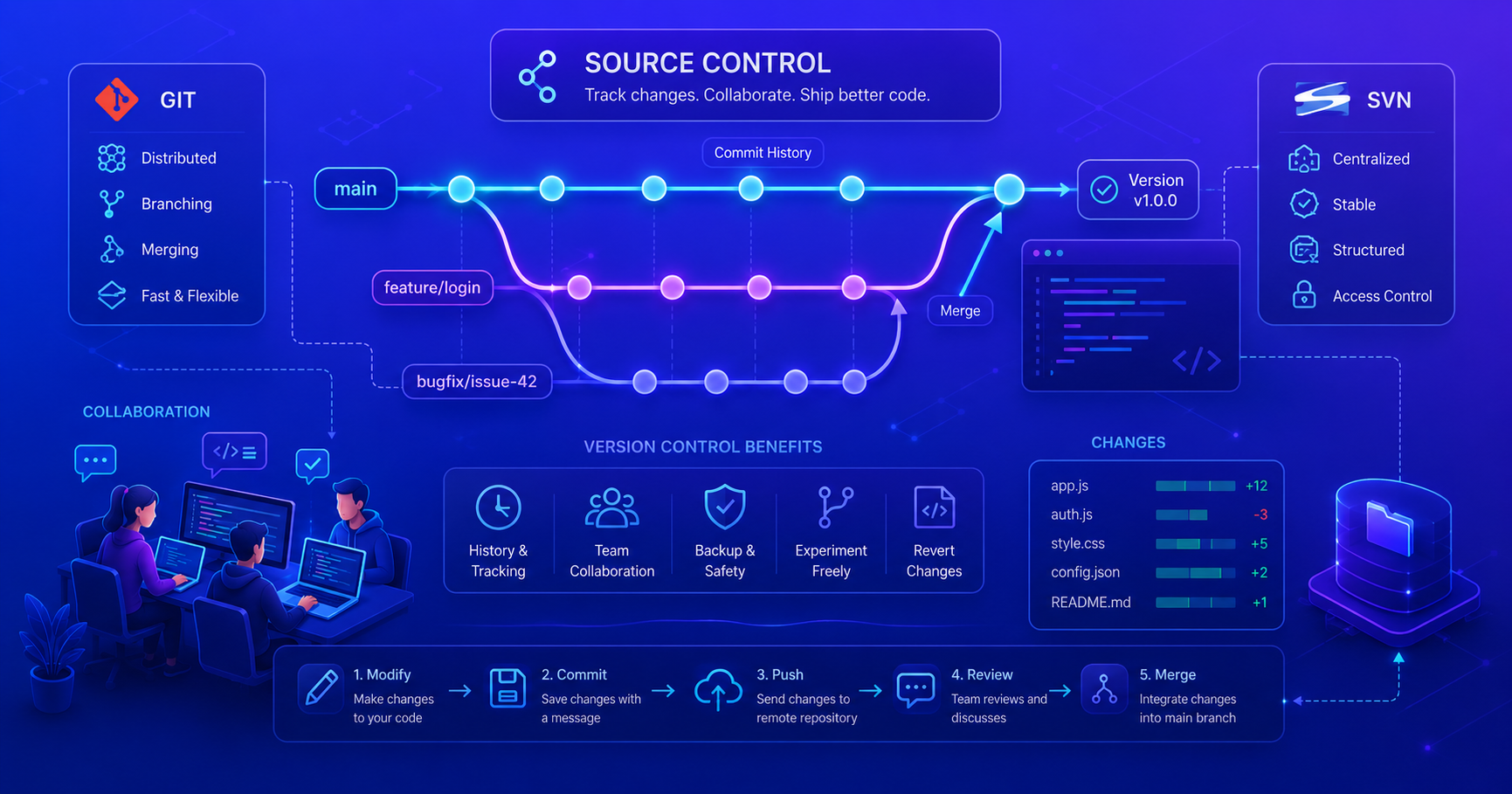
Source control (also called version control) is a system that tracks and manages changes to your code over time. Think of it as a detailed history book for your projectevery change is recorded with who made it, when they made it, and why they made it.
Why is Essential?
In real-world software development, source control is non-negotiable. Here’s why:
- History and Accountability: Every change is tracked, so you know exactly what changed and who changed it
- Collaboration: Multiple developers can work on the same project without overwriting each other’s code
- Reverting Changes: Made a mistake? Roll back to a previous working version
- Branching and Experimentation: Create isolated branches to test new features safely
- Code Review and Quality: Teams can review changes before integrating them into the main codebase
- Backup and Redundancy: Your code exists in multiple locations, protecting against data loss
Imagine trying to coordinate changes across a team of developers without version controlit would be chaos. Files would get overwritten, changes would be lost, and nobody would know which version was correct.
Centralized vs. Distributed
Two main approaches exist for organizing version control systems: Centralized and Distributed. Each has its own strengths and weaknesses.
Centralized
Single source of truth model.
In centralized systems like SVN (Subversion), there’s a single central server that holds the complete history of the project. Developers connect to this server to:
- Check out (download) the current code
- Commit (upload) their changes
- View the history
Characteristics:
- One central repository
- Developers work against the central server
- Requires network connection for most operations
- Simpler workflow for small teams
- Easier to enforce strict access control
Pros:
- Simple to understand and set up
- Clear single source of truth
- Easier to manage access permissions
Cons:
- Requires constant network connection
- Server is a single point of failure
- Branching is expensive (requires copying files)
- Less suitable for distributed teams
Distributed
Everyone has a full copy model.
In distributed systems like Git, every developer has a complete copy of the entire repository history on their local machine. This enables:
- Working offline
- Creating branches instantly
- Merging changes between copies
- Multiple remote repositories
Characteristics:
- Every clone is a full backup
- Developers work locally
- No central server required for most operations
- Flexibility in workflow
- Natural support for parallel development
Pros:
- Full functionality available offline
- Every clone is a complete backup
- Branching and merging are cheap and fast
- Better for distributed teams
- Supports multiple workflows
Cons:
- Steeper learning curve
- More complex mental model
- Requires discipline in workflow
GIT vs SVN
Two main approaches dominate source control:
- Git (Distributed): Every developer has a complete copy of the project history. Industry standard today, used by GitHub, GitLab, and most modern teams.
- SVN (Centralized): Single central server holds the history. Simpler for small teams, but requires network connection and doesn’t support offline work as well.
For most modern development, Git is the standard. We’ll dive deeper into Git and SVN in dedicated posts.
Core Concepts
The following concepts apply to both Git and SVN, though they’re more accessible in Git:
- Repository: The storage location containing all your files and complete history
- Commit: A snapshot of changes with metadata (who, when, why)
- Branch: An independent line of development
- Merge: Combining changes from different branches
These concepts form the foundation of how source control works. We’ll explore practical usage in the dedicated Git and SVN posts.
Why Teams Use Source Control?
Source control enables effective team collaboration:
- Parallel Development: Multiple developers work simultaneously on different features
- Code Review: Changes are reviewed before merging (via pull requests)
- Accountability: Clear record of who made what changes and when
- Quality Assurance: Prevents bugs from going to production
- Safe Experimentation: Isolated branches allow risk-free development
- Integration: Changes are carefully merged to maintain stability
Key Takeaways
✓ Source control is fundamental to professional software development
✓ Enables team collaboration through organized code management
✓ Tracks every change with full accountability and history
✓ Supports parallel development through branching
✓ Prevents conflicts through systematic change management
✓ Enables code reviews for quality assurance
Source control isn’t just about backing up code, it’s about enabling teams to work together efficiently and maintain code quality.
Next Steps
Now that you understand source control fundamentals:
- Learn Git in depth: Commands, workflows, and best practices
- Understand SVN: Centralized version control
- Practice with a real project: Start using source control on your projects today
- Explore GitHub/GitLab: Set up an account and contribute to open source