
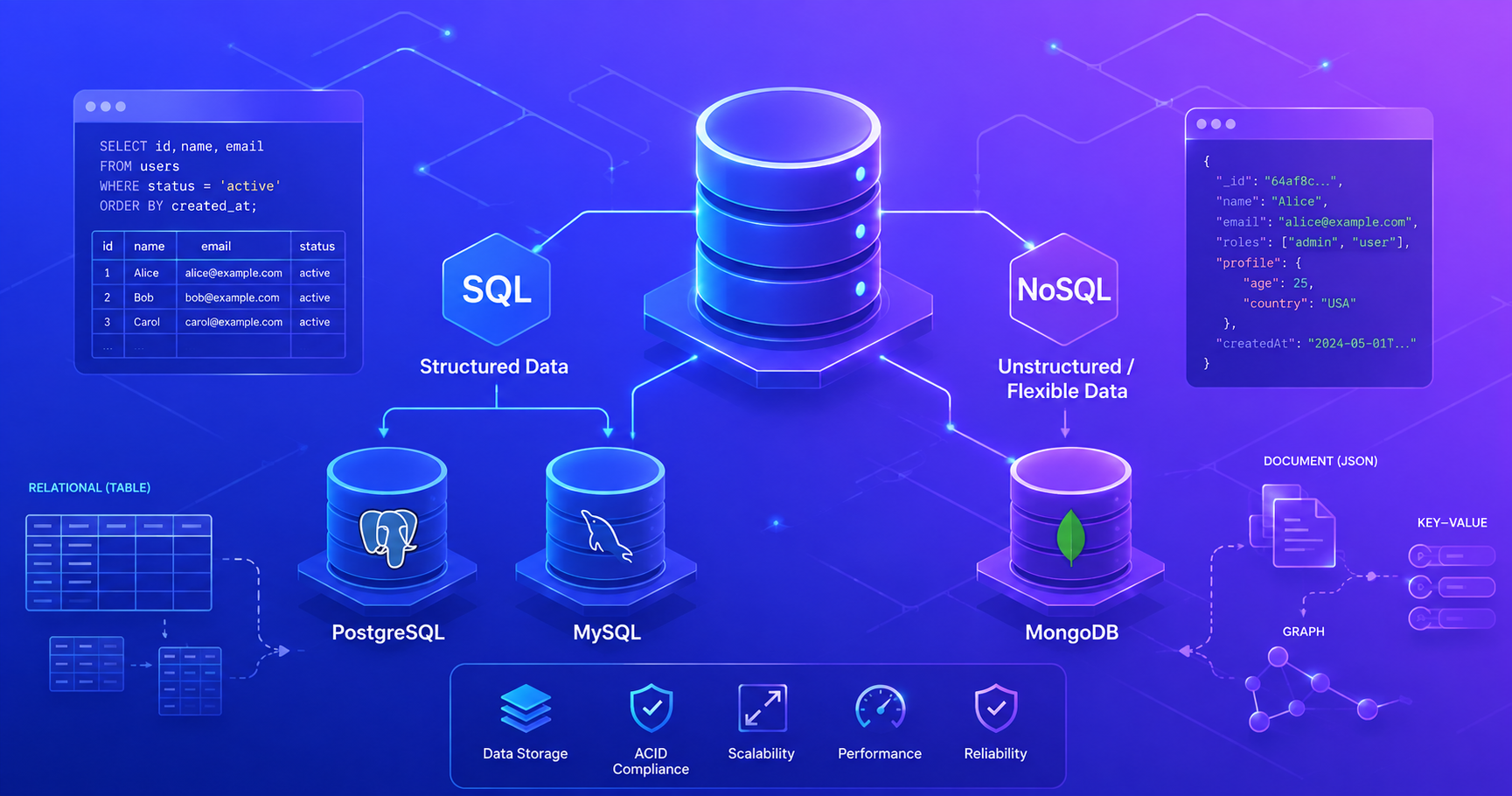
This post introduces the Database section of our Junior Software Engineer roadmap. It sets the foundation for understanding data persistence, which is critical for every backend application you’ll build.
Why Databases Matter
When you build an application, you need somewhere to store data. You could write data to text files on disk, but that approach quickly becomes problematic as your application grows. Databases solve this problem by providing a structured, reliable, and efficient way to store, retrieve, and manage data.
Think of a database like a highly organized filing system in a corporate office. Instead of randomly throwing documents into drawers, databases organize information into tables, documents, or collections with clear structure and rules. They ensure data integrity, prevent duplicates, and allow you to quickly find exactly what you’re looking for, even when you have millions of files.
Data Persistence
Why applications need databases.
Data persistence means that information survives even after your application stops running. Without a database, all data stored in your application’s memory disappears the moment the program exits. A database writes data to permanent storage (like a hard drive) so it survives across application restarts, server crashes, and power outages.
The Two Main Database Types
Modern databases fall into two major categories: SQL (Relational) and NoSQL (Non-Relational). Understanding when to use each is one of the most important skills for backend developers.
Database Type Hierarchy
Here’s how the major database types relate to each other:
graph TB
    DB["Databases"]
    DB --> SQL["SQL (Relational)"]
    DB --> NoSQL["NoSQL (Non-Relational)"]

    SQL --> PostgreSQL["PostgreSQL"]
    SQL --> MySQL["MySQL"]
    SQL --> Oracle["Oracle"]

    NoSQL --> Document["Document Stores"]
    NoSQL --> KeyValue["Key-Value Stores"]
    NoSQL --> TimeSeries["Time-Series Stores"]
    NoSQL --> Graph["Graph Databases"]

    Document --> MongoDB["MongoDB"]
    KeyValue --> Redis["Redis"]
    KeyValue --> DynamoDB["Amazon DynamoDB"]

    style DB fill:#e1f5ff
    style SQL fill:#fff3e0
    style NoSQL fill:#f3e5f5
    style PostgreSQL fill:#ffe0b2
    style MySQL fill:#ffe0b2
    style MongoDB fill:#e1bee7
    style Redis fill:#e1bee7
SQL Databases: Structured and Reliable
SQL (Structured Query Language) databases, also called relational databases, organize data into tables with rows and columns, similar to spreadsheets. Each table has a predefined schema that specifies exactly what columns exist and what data types they contain.
SQL Database Characteristics
ACID Properties
The foundation of SQL reliability.
SQL databases guarantee ACID properties:
- Atomicity: Transactions either complete fully or not at all. No partial updates.
- Consistency: The database moves from one valid state to another. Rules and constraints are always enforced.
- Isolation: Concurrent transactions don’t interfere with each other.
- Durability: Once committed, data won’t be lost even if the system crashes.
These properties make SQL databases ideal for applications where data accuracy is critical (banking, healthcare, e-commerce).
Real-World SQL Use Cases
SQL databases excel in scenarios where:
- Data relationships matter: A social media platform where users have posts, comments, and followers
- Transactions are critical: Banking systems where money must transfer atomically
- Complex queries are needed: Analytics dashboards that join data from multiple tables
- Schema consistency is required: Medical records systems with strict data requirements
SQL Examples: PostgreSQL and MySQL
PostgreSQL is a powerful, open-source SQL database known for reliability and advanced features. It’s excellent for complex applications.
MySQL is simpler, lightweight, and one of the most popular databases worldwide (part of the LAMP stack). It’s great for web applications.
1
2
3
4
5
6
7
8
// Example: SQL query to find all posts by a specific user
String userId = "user123";
String sql = "SELECT id, title, content, created_at " +
             "FROM posts " +
             "WHERE user_id = ? " +
             "ORDER BY created_at DESC";

// This retrieves structured data from a predefined table
NoSQL Databases: Flexible and Scalable
NoSQL (Not Only SQL) databases take a different approach. Instead of rigid tables, they store data in flexible formats like documents, key-value pairs, or graphs. NoSQL databases don’t require a predefined schema, so you can store different structures in the same collection.
NoSQL Database Characteristics
BASE Properties
The flexibility tradeoff of NoSQL.
NoSQL databases prioritize availability and scalability over strict consistency, following BASE properties:
- Basically Available: System remains available even if some nodes fail.
- Soft state: The system state can change without input (eventual consistency).
- Eventually consistent: After some time, all nodes will see the same data.
This is the opposite of ACID, you gain flexibility and scale at the cost of eventual consistency guarantees.
Real-World NoSQL Use Cases
NoSQL databases excel in scenarios where:
- Scale and speed matter: Real-time analytics processing millions of events per second
- Flexible schemas are needed: Content platforms where different articles have different fields
- Horizontal scaling is required: Distributed systems spanning multiple servers/regions
- Write-heavy applications: Applications that store logs, metrics, or sensor data constantly
- Rapid prototyping: Startups where data requirements are still evolving
MongoDB: The Document Database
MongoDB is the most popular NoSQL database. It stores data as documents (similar to JSON objects) in collections (similar to tables).
1
2
3
4
5
6
7
8
9
10
11
12
13
14
15
16
17
18
19
20
21
22
23
// Example: MongoDB document structure (stored as JSON)
// Collection: users
{
  "_id": ObjectId("507f1f77bcf86cd799439011"),
  "name": "Alice Johnson",
  "email": "alice@example.com",
  "age": 28,
  "tags": ["developer", "python", "remote"],
  "address": {
    "street": "123 Main St",
    "city": "Portland",
    "zip": "97201"
  }
}

// Different documents in the same collection can have different fields
{
  "_id": ObjectId("507f1f77bcf86cd799439012"),
  "name": "Bob Smith",
  "email": "bob@example.com",
  "premium": true,
  // Note: Bob's document doesn't have 'age' or 'address' - that's fine!
}
With MongoDB, you don’t need to define a schema upfront. Documents in the same collection can have different fields, making it ideal for rapidly evolving applications.
SQL vs NoSQL: Side-by-Side Comparison
| Aspect | SQL (Relational) | NoSQL (Document/Key-Value) |
|---|---|---|
| Data Structure | Tables with rows and columns | Documents, key-value pairs, graphs |
| Schema | Rigid, predefined schema required | Flexible, schema-less |
| Consistency | Strong (ACID) | Eventual (BASE) |
| Scalability | Vertical (add more CPU/memory) | Horizontal (add more servers) |
| Query Language | SQL (standardized) | Database-specific (e.g., MongoDB Query Language) |
| Relationships | Built-in foreign keys and joins | Denormalization or manual linking |
| Best For | Structured data, complex relationships, strict consistency | Unstructured data, high scale, rapid changes |
| Examples | PostgreSQL, MySQL, Oracle | MongoDB, Redis, Cassandra |
| Learning Curve | Moderate (SQL is standard) | Steeper (each database is different) |
Pro Tip: Don’t think of SQL vs NoSQL as “old vs new” or “good vs bad.” They’re different tools for different jobs. Most modern applications use both, SQL for transactional data and NoSQL for high-volume or flexible data.
Making the Choice: SQL or NoSQL?
Choosing between SQL and NoSQL depends on your specific application requirements:
Choose SQL When:
- Your data has clear relationships (users → posts → comments)
- Data consistency is critical (financial transactions, medical records)
- You need complex queries across multiple tables
- Your schema is stable and unlikely to change frequently
- You’re building traditional business applications
Choose NoSQL When:
- You need to handle massive scale and high throughput
- Your data structure is unstructured or evolving rapidly
- You’re storing logs, metrics, or sensor data
- You need to scale horizontally across multiple servers
- Eventual consistency is acceptable for your use case
Polyglot Persistence
Using multiple databases in one system.
Modern applications often use both SQL and NoSQL databases. This approach, called polyglot persistence, lets you use the right database for each specific job. For example, an e-commerce platform might use PostgreSQL for orders and user accounts (strong consistency needed) and MongoDB for product catalogs and user preferences (flexible schema benefits). Redis might store session data and cache frequently accessed items for speed.
What’s Next?
Now that you understand the fundamental differences, we’ll dive deeper into:
- PostgreSQL: Learn how to design schemas, write complex queries, and optimize SQL
- MySQL: Master the most widely-used database on the web
- MongoDB: Discover document-oriented design and flexible schema management
Each database has its own section with practical examples, best practices, and real-world patterns you’ll use as a developer.
Key Takeaways
- Databases provide reliable, persistent storage for application data
- SQL databases organize data in tables and guarantee strong consistency
- NoSQL databases provide flexibility and scale for unstructured or high-volume data
- PostgreSQL and MySQL are the most popular SQL databases for different needs
- MongoDB is the leading document-oriented NoSQL database
- Choose the right database for your specific use case, most applications use both
Start with a solid foundation in SQL (we recommend PostgreSQL for learning), then explore NoSQL as you encounter scaling challenges and flexible schema requirements.
References & Further Reading
SEG Blog Posts
- SQL Databases - Deep dive into relational databases
- PostgreSQL - Master the powerful open-source SQL database
- MySQL - Learn the world’s most popular web database
- NoSQL Databases - Understanding non-relational databases
- MongoDB - Document-oriented database design and best practices