APIs are the connective tissue of the modern web. This post introduces APIs and their types, preparing you to understand how applications communicate. If you need a refresher on networking basics, consider reviewing fundamentals before diving into API interactions.
What Are APIs and Why They Matter
An API (Application Programming Interface) is a set of rules and tools that allows different software applications to communicate with each other. Think of an API like a restaurant menu: you (the client) don’t need to know how the kitchen works; you simply order from the menu, and the restaurant provides what you requested.
In modern software development, APIs are everywhere:
- Social media: When you log into a website using your Facebook account, that website uses Facebook’s API
- Payment processing: E-commerce sites use payment APIs to process credit cards securely
- Weather apps: Mobile applications fetch weather data from weather service APIs
- Integration services: Different business systems communicate internally through APIs
APIs are critical because they enable:
- Modularity: Teams can develop services independently
- Reusability: Code and functionality can be used by multiple applications
- Security: APIs provide controlled access to system resources
- Scalability: Applications can grow without massive rewrites
Understanding Client-Server Communication
Before exploring API types, let’s understand the fundamental model: client-server architecture.
Client-Server Model
How computers talk over the network.
The client-server model describes how applications communicate over a network:
- Client: The application requesting data or services (like your web browser or mobile app)
- Server: The application providing data or services (like a web server hosting a service)
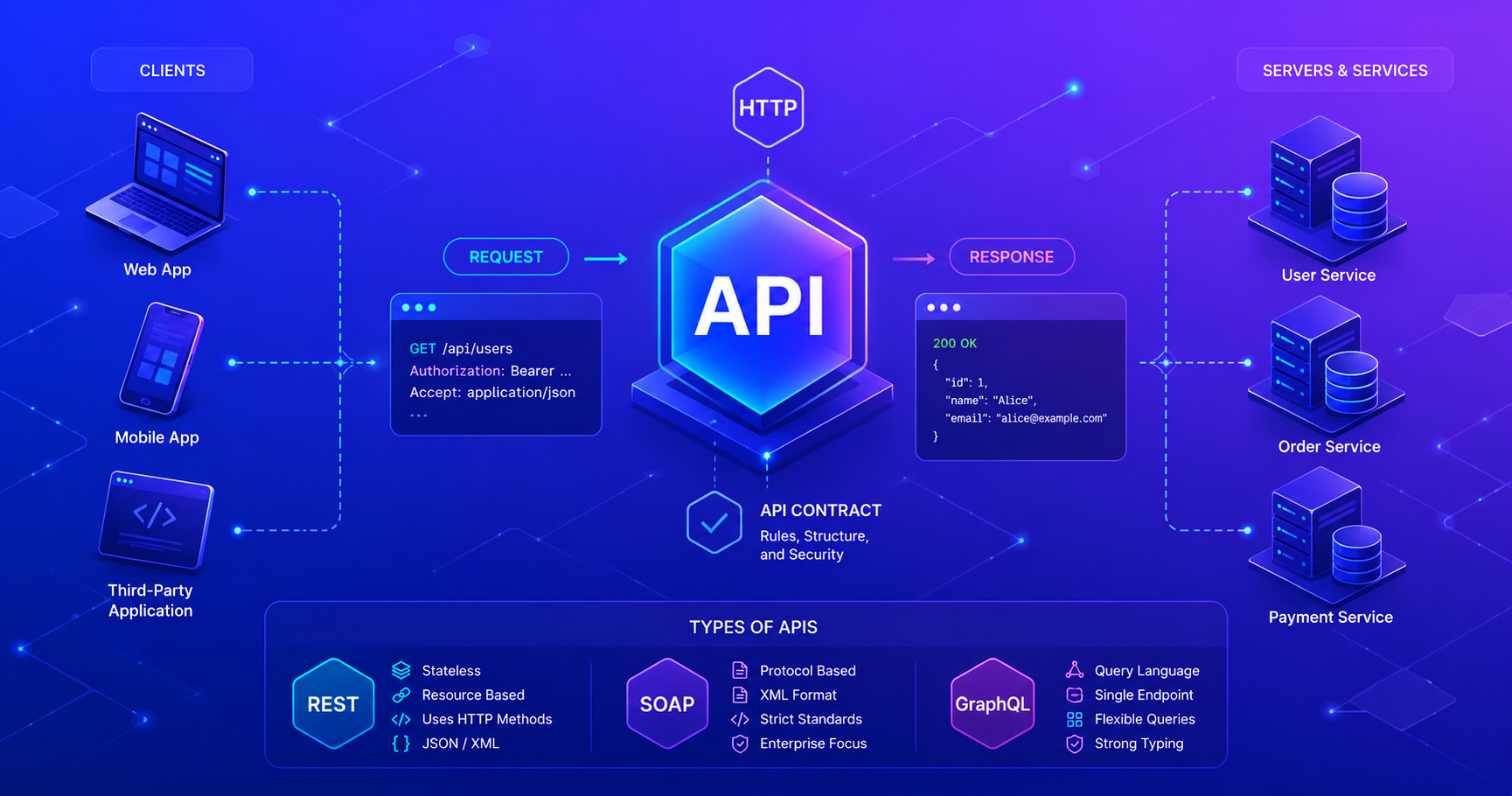
The client sends a request to the server, and the server responds with a response. This request-response cycle is fundamental to how APIs work.
The communication typically happens over HTTP (HyperText Transfer Protocol) or HTTPS (the secure version). HTTP defines how messages are formatted and transmitted across the internet.
Visualizing API Communication
Here’s a typical API request-response flow:
sequenceDiagram
    participant Client as Client App
    participant Server as API Server

    Client->>Server: 1. HTTP Request<br/>(GET /users/123)
    Note over Server: Processing<br/>Database Query
    Server->>Client: 2. HTTP Response<br/>(200 OK + JSON Data)
    Note over Client: Display Data<br/>to User
This diagram shows:
- The client initiates communication by sending an HTTP request
- The server processes the request (queries database, performs logic)
- The server sends back an HTTP response with status code and data
- The client receives and processes the response
Types of APIs: REST, SOAP, and GraphQL
APIs come in different flavors, each with different design philosophies and use cases. Let’s explore the main types:
REST (Representational State Transfer)
The modern industry standard you’ll use most often.
REST APIs use HTTP verbs (GET, POST, PUT, DELETE) to perform operations on resources. Resources are identified by URLs, and the HTTP method indicates what action to perform.
Key characteristics:
- Uses standard HTTP methods
- Resources are represented by URLs
- Stateless (each request is independent)
- Simple and widely understood
- Easy to cache
Example: GET /api/users/123 retrieves the user with ID 123.
REST APIs became the industry standard because they’re simple, leverage existing HTTP infrastructure, and scale well. Most APIs you’ll encounter as a junior developer will be REST APIs.
SOAP (Simple Object Access Protocol)
Older, more complex protocol used in enterprise systems.
SOAP is an older protocol that uses XML messages for communication. It’s more formal and rigid than REST.
Key characteristics:
- Uses XML for message format
- More complex than REST
- Built-in security features (WS-Security)
- Better for complex, formal communication
- Heavier overhead
Where you’ll see it: Legacy enterprise systems, financial services, healthcare.
GraphQL
Modern query language that gives clients precise control over data.
GraphQL is a query language and runtime developed by Facebook. Instead of fixed endpoints, clients specify exactly what data they need.
Key characteristics:
- Clients request exactly what they need
- Single endpoint (typically
/graphql) - Reduces over-fetching and under-fetching
- Strong typing system
- Better for complex, interconnected data
Example: Instead of GET /users/123, you send a query specifying which user fields you want.
API Type Comparison
Here’s a quick comparison of the three main types:
| Feature | REST | SOAP | GraphQL |
|---|---|---|---|
| Protocol | HTTP | HTTP/SMTP | HTTP |
| Data Format | JSON/XML | XML | JSON |
| Learning Curve | Easy | Steep | Moderate |
| Performance | Good | Heavier | Excellent for specific needs |
| Caching | Built-in (HTTP) | Limited | No built-in |
| Use Cases | General web APIs | Enterprise systems | Modern web/mobile apps |
| Industry Adoption | Ubiquitous | Declining | Growing |
Why REST APIs Are Essential for Junior Developers
As a junior software engineer, you should master REST APIs first. Here’s why:
Industry Standard: The vast majority of web APIs you’ll encounter are REST APIs. From Twitter to GitHub to Stripe, REST dominates the industry.
Simplicity: REST is conceptually simple, it leverages HTTP methods you already use in your browser. No complex protocols to learn.
Job Market: REST API knowledge is a fundamental expectation in junior developer job descriptions and interviews.
Foundation: Understanding REST will make it easier to learn GraphQL or SOAP later if needed.
Practical: REST APIs are easy to test and debug with simple tools like curl or Postman.
Don’t worry about mastering everything at once. Focus on REST APIs first, and you’ll build a foundation for understanding other API types and advanced concepts.
Real-World API Examples
Example 1: Weather Application
Imagine you’re building a weather app. Your mobile application communicates with a weather API server:
1
2
3
4
5
6
Client (Mobile App)
    ↓ (HTTP Request: GET /weather?city=London)
Server (Weather API)
    ↓ (HTTP Response: 200 OK + JSON with temperature, forecast, etc.)
Client (Mobile App)
    ↓ (Display weather to user)
Example 2: Social Media Integration
When you click “Sign in with Google” on a website:
1
2
3
4
5
6
7
8
9
Client (Website)
    ↓ (Redirect to Google's login page)
User (Authentication)
    ↓ (Google verifies credentials)
Server (Google's API)
    ↓ (Send authorization token back to website)
Client (Website)
    ↓ (Use token to fetch user profile from Google's API)
User (Logged in!)
Example 3: E-Commerce Order Processing
1
2
3
4
5
6
7
8
Client (Shopping App)
    ↓ (POST /orders with item details)
Server (E-commerce API)
    ↓ (Validate items, calculate tax, process payment)
Server (E-commerce API)
    ↓ (HTTP Response: 201 Created + Order confirmation)
Client (Shopping App)
    ↓ (Display order confirmation to user)
HTTP Methods and APIs
REST APIs rely on HTTP methods to indicate what action to perform. Here are the primary ones:
1
2
3
4
5
GET     - Retrieve data (safe, read-only)
POST    - Create new resources
PUT     - Update entire resource
PATCH   - Partially update a resource
DELETE  - Remove a resource
Code Example: Making API Requests
Here’s how you might make API requests in Python:
1
2
3
4
5
6
7
8
9
10
11
12
13
14
15
16
17
18
19
20
21
22
import requests

# GET request - retrieve user data
response = requests.get('https://api.example.com/users/123')
if response.status_code == 200:
    user_data = response.json()
    print(f"User: {user_data['name']}")

# POST request - create a new user
new_user = {
    'name': 'Alice Johnson',
    'email': 'alice@example.com'
}
response = requests.post('https://api.example.com/users', json=new_user)
if response.status_code == 201:
    created_user = response.json()
    print(f"Created user with ID: {created_user['id']}")

# DELETE request - remove a user
response = requests.delete('https://api.example.com/users/123')
if response.status_code == 204:
    print("User deleted successfully")
Here’s the equivalent in Java:
1
2
3
4
5
6
7
8
9
10
11
12
13
14
15
16
17
18
19
20
21
22
23
24
25
26
27
28
29
30
31
32
33
34
35
36
37
38
import java.net.http.HttpClient;
import java.net.http.HttpRequest;
import java.net.http.HttpResponse;
import java.net.URI;

public class APIExample {
    public static void main(String[] args) throws Exception {
        HttpClient client = HttpClient.newHttpClient();

        // GET request - retrieve user data
        HttpRequest getRequest = HttpRequest.newBuilder()
            .uri(new URI("https://api.example.com/users/123"))
            .GET()
            .build();

        HttpResponse<String> getResponse =
            client.send(getRequest, HttpResponse.BodyHandlers.ofString());

        if (getResponse.statusCode() == 200) {
            System.out.println("User data: " + getResponse.body());
        }

        // POST request - create a new user
        String jsonBody = "{\"name\":\"Alice Johnson\",\"email\":\"alice@example.com\"}";
        HttpRequest postRequest = HttpRequest.newBuilder()
            .uri(new URI("https://api.example.com/users"))
            .header("Content-Type", "application/json")
            .POST(HttpRequest.BodyPublishers.ofString(jsonBody))
            .build();

        HttpResponse<String> postResponse =
            client.send(postRequest, HttpResponse.BodyHandlers.ofString());

        if (postResponse.statusCode() == 201) {
            System.out.println("User created: " + postResponse.body());
        }
    }
}
HTTP Status Codes
When an API server responds, it includes a status code that indicates the result:
- 2xx (Success)
200 OK- Request succeeded201 Created- Resource created successfully204 No Content- Request succeeded, no response body
- 4xx (Client Error)
400 Bad Request- Malformed request401 Unauthorized- Authentication required404 Not Found- Resource doesn’t exist429 Too Many Requests- Rate limit exceeded
- 5xx (Server Error)
500 Internal Server Error- Server error503 Service Unavailable- Server temporarily down
Understanding these codes is essential for debugging API issues and handling errors gracefully in your code.
JSON: The Data Format
Most modern REST APIs use JSON (JavaScript Object Notation) to format data. JSON is human-readable and language-independent.
Example API response:
1
2
3
4
5
6
7
8
{
  "id": 123,
  "name": "Alice Johnson",
  "email": "alice@example.com",
  "created_at": "2026-09-01T10:30:00Z",
  "is_active": true,
  "tags": ["developer", "junior"]
}
Notice how structured this is, it’s easy to parse and understand the data relationships.
Key Takeaways
As you embark on your API journey as a junior developer:
APIs are everywhere: They power modern applications and enable communication between systems.
REST APIs dominate: Focus on learning REST APIs first, they’re simple, widely used, and a foundation for other types.
Client-server model: Understand how clients send requests and servers respond. This is fundamental.
HTTP methods matter: GET, POST, PUT, DELETE, these verbs tell the API what action to perform.
Status codes are crucial: Always check the HTTP status code to understand whether your request succeeded.
JSON is the standard: Most modern APIs use JSON for data exchange, learn to read and work with it.
Start simple: Begin by consuming existing APIs before building your own. Practice with public APIs like OpenWeather, GitHub, or JSONPlaceholder.
The best way to learn APIs is by doing. Find a public API, read its documentation, and build a small project using it. Practice makes perfect!
Next Steps
Now that you understand what APIs are and why they’re important, the next steps in your learning journey might include:
- Hands-on practice: Consume a public API using curl, Postman, or your favorite programming language
- Build a simple client: Create a small application that fetches data from a public API
- Understand authentication: Learn about API keys and authentication mechanisms like OAuth
- Explore frameworks: Learn how to build your own REST API using frameworks like Flask (Python), Spring Boot (Java), or Express.js (Node.js)
APIs are a core skill for any software engineer, and mastering them will open doors to countless opportunities in your career.
References & Further Reading
SEG Blog Posts
- REST API - Deep dive into RESTful architecture and design principles