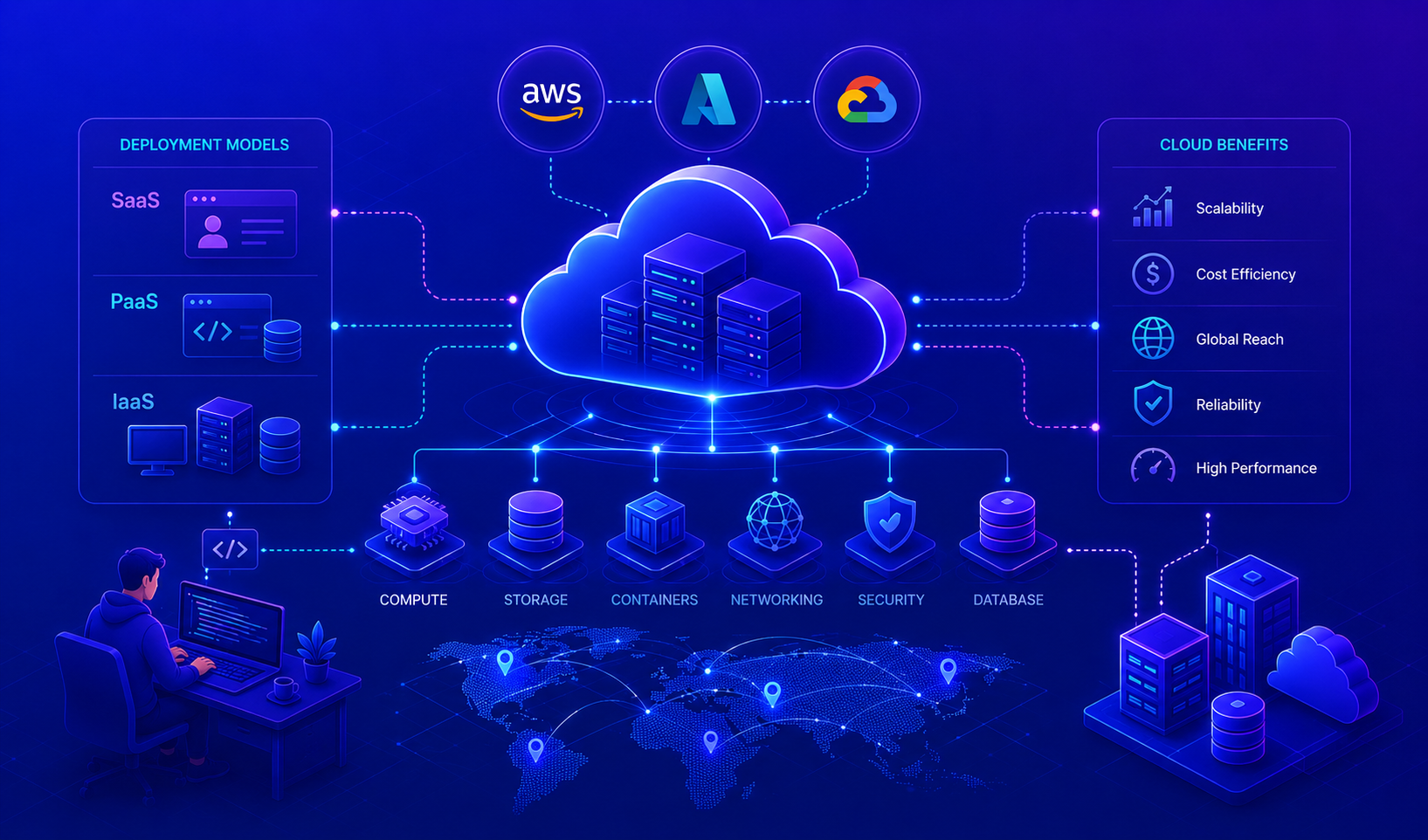
This post introduces cloud providers and the services they offer. Cloud providers have become the default deployment platform for modern applications.
What Are Cloud Providers?
Cloud providers are companies that offer computing resources, such as servers, storage, databases, and software, over the internet. Instead of building and maintaining your own physical infrastructure, you rent these resources from cloud providers who handle the hardware, maintenance, security, and updates.
Think of it like renting an apartment instead of building a house. You get the space and utilities you need without the responsibility of construction and maintenance.
Why Cloud Providers Matter
As a junior engineer, understanding cloud providers is essential because:
- Industry Standard: Most companies today deploy applications through cloud providers
- Cost Efficiency: Pay only for what you use, no upfront hardware investments
- Scalability: Easily handle traffic spikes without purchasing new servers
- Global Reach: Deploy applications worldwide within minutes
- Focus on Code: Spend time building features instead of managing servers
Major Cloud Providers
The cloud computing market has several major providers, each offering similar services with different strengths and specializations:
- Amazon Web Services (AWS): Market leader with 200+ services and the largest ecosystem
- Microsoft Azure: Strong integration with Microsoft products and enterprise environments
- Google Cloud Platform (GCP): Excellent for data analytics, machine learning, and containerized workloads
- Heroku, DigitalOcean, Linode: Simpler platforms ideal for startups and smaller deployments
Each provider offers compute, storage, databases, and networking services, the foundational building blocks of cloud applications.
What Cloud Providers Offer: Service Models
Cloud providers deliver services through different models, allowing you to choose how much responsibility you want to take on:
graph TB
    Cloud["Cloud Service Models<br/>What Providers Offer"]

    Cloud --> IaaS["<b>Infrastructure as a Service (IaaS)</b><br/>You manage: Applications, Data, Runtime<br/>Provider manages: Infrastructure"]
    Cloud --> PaaS["<b>Platform as a Service (PaaS)</b><br/>You manage: Applications, Data<br/>Provider manages: Runtime, Infrastructure"]
    Cloud --> SaaS["<b>Software as a Service (SaaS)</b><br/>Provider manages: Everything<br/>You just use the application"]

    IaaS --> IaaSEx["Examples: AWS EC2, Google Compute Engine"]
    PaaS --> PaaSEx["Examples: AWS App Runner, Heroku"]
    SaaS --> SaaSEx["Examples: Slack, Microsoft 365, Salesforce"]
Detailed Comparison
| Aspect | IaaS | PaaS | SaaS |
|---|---|---|---|
| What you control | OS, middleware, runtime, applications | Applications and data only | Nothing, you just use it |
| What provider controls | Virtualization, servers, networking, storage | Infrastructure, databases, frameworks | Everything |
| Best for | Full control, custom configurations | Rapid development, reduced complexity | End-user applications |
| Complexity | High, requires infrastructure knowledge | Medium, focuses on development | Low, ready to use |
| Examples | EC2, DigitalOcean, Google Compute | App Runner, Google App Engine | Gmail, Slack, Trello |
| Cost model | Pay per instance/hour | Pay per usage/deployment | Subscription-based |
IaaS (Infrastructure as a Service)
Full control, manage everything except physical hardware.
With IaaS, you’re essentially renting virtual computers and storage. You install and manage the operating system, middleware, runtime environments, and applications. This gives you maximum control but requires the most infrastructure knowledge.
Common tasks:
- Installing operating systems
- Configuring security groups (firewalls)
- Managing networking between servers
- Setting up databases
- Scaling servers manually or with auto-scaling rules
Perfect when you need custom configurations or specific technical requirements.
PaaS (Platform as a Service)
Focus on code, provider manages infrastructure.
PaaS abstracts away infrastructure concerns. You write code and push it; the platform handles deployment, scaling, and maintenance. It’s ideal for developing web applications, APIs, and microservices quickly without infrastructure overhead.
Common features:
- Built-in databases and caching services
- Automatic scaling and load balancing
- Pre-configured development environments
- CI/CD pipelines for deployments
- Managed security and updates
Great for rapid development and startups without DevOps expertise.
SaaS (Software as a Service)
Ready-to-use applications delivered over the internet.
SaaS applications run entirely in the cloud. You simply log in and use them, no installation, configuration, or maintenance required. The provider handles everything from infrastructure to feature updates.
Common characteristics:
- Web-based or mobile application access
- Automatic updates and patches
- Collaboration features built-in
- Subscription pricing model
- Data stored securely in the cloud
Examples include Gmail, Slack, Microsoft 365, and project management tools like Jira.
As a junior engineer, you’ll likely work most with IaaS (EC2 instances, storage) and PaaS (App Runner, managed databases). Understanding when to use each model is a valuable skill.
Why Cloud Providers Offer Multiple Service Models
Different applications have different needs. Cloud providers offer IaaS, PaaS, and SaaS so you can choose:
Cloud Computing Benefits
| Benefit | What It Means | Impact |
|---|---|---|
| Scalability | Automatically handle more traffic | No manual server provisioning needed |
| Cost Efficiency | Pay only for resources used | Lower startup costs, no hardware investment |
| Global Reach | Deploy worldwide instantly | Users get optimal performance from nearest location |
| Reliability | High uptime guarantees (99.99%) | Automatic backups and redundancy built-in |
| Flexibility | Multiple service options | Adapt technology as needs change |
| Reduced Operations | Provider manages infrastructure | Teams focus on features, not servers |
On-Premises vs Cloud Comparison
Let’s compare running applications on your own servers versus using cloud services:
graph TB
    Decision{Where to run your application?}

    Decision -->|On-Premises| OnPrem["🏢 On-Premises<br/>Your Data Center"]
    OnPrem --> OnPremDetails["
    ✅ Full control<br/>
    ✅ No vendor lock-in<br/>
    ✅ Privacy (data stays local)<br/>
    <br/>
    ❌ High upfront costs<br/>
    ❌ Manual scaling<br/>
    ❌ Maintenance burden<br/>
    ❌ Limited geographic reach<br/>
    "]

    Decision -->|Cloud| Cloud["☁️ Cloud Provider<br/>AWS/GCP/Azure"]
    Cloud --> CloudDetails["
    ✅ Lower costs<br/>
    ✅ Automatic scaling<br/>
    ✅ Global deployment<br/>
    ✅ Less maintenance<br/>
    <br/>
    ❌ Vendor lock-in risk<br/>
    ❌ Less control<br/>
    ❌ Compliance challenges<br/>
    ❌ Data residency requirements<br/>
    "]
When to Use Each Approach
| Aspect | On-Premises | Cloud |
|---|---|---|
| Startup Phase | ❌ Too expensive to start | ✅ Perfect, low cost entry |
| Scaling | ❌ Takes weeks to add capacity | ✅ Automatic and instant |
| Maintenance | ❌ Your responsibility | ✅ Provider’s responsibility |
| Cost at Scale | ❌ Can be cheaper at massive scale | ✅ Economical for most organizations |
| Compliance | ✅ Full control | ⚠️ Must verify compliance capabilities |
| Legacy Systems | ✅ Often necessary | ❌ Can be complex to migrate |
Most modern software companies use hybrid approaches, combining cloud services with on-premises infrastructure for optimal cost, compliance, and performance.
Key Takeaways
✓ Cloud computing means renting computing resources over the internet instead of managing physical hardware
✓ IaaS gives you full control of infrastructure, PaaS handles infrastructure for you, SaaS is ready-to-use software
✓ Cloud providers (AWS, Azure, GCP) offer similar core services: compute, storage, databases, networking
✓ Cloud benefits include scalability, cost efficiency, global reach, and reduced maintenance burden
✓ Choose a provider based on your needs, budget, and ecosystem requirements
Next Steps
- Choose a cloud provider: AWS is market leader, but Azure and GCP are excellent alternatives
- Understand your workload: Will you need IaaS, PaaS, or SaaS solutions?
- Get hands-on: Most providers offer free tiers for learning without cost